🖨️ Imposition Calculator
Plan your print sheet layouts, signatures, and page counts with precision
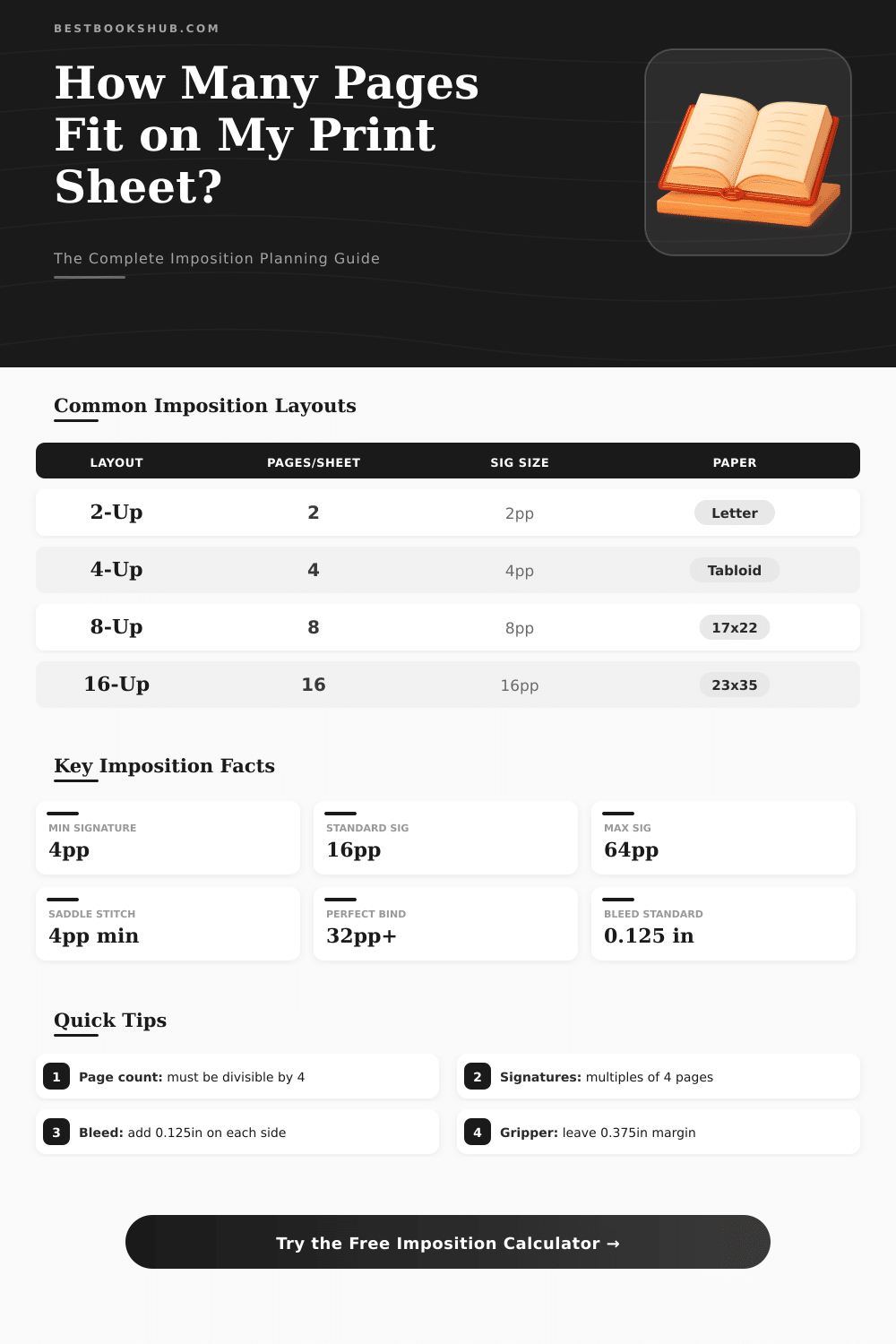
| Pages-Up | Pages per Sig | Sheets per Sig | Min Page Count | Sheet Area |
|---|---|---|---|---|
| 2-Up | 4 pp | 1 sheet | 4 pp | Letter (8.5x11) |
| 4-Up | 8 pp | 1 sheet | 8 pp | Tabloid (11x17) |
| 8-Up | 16 pp | 1 sheet | 16 pp | 17x22 in |
| 16-Up | 32 pp | 1 sheet | 32 pp | 23x35 in |
| 32-Up | 64 pp | 1 sheet | 64 pp | 25x38 in |
| Paper Grade | US Weight | GSM | Typical Use |
|---|---|---|---|
| Bond | 20 lb | 75 gsm | Office copy paper |
| Bond | 24 lb | 90 gsm | Premium letterhead |
| Text | 60 lb | 90 gsm | Brochures, books |
| Text | 70 lb | 104 gsm | Magazines, catalogs |
| Text | 80 lb | 118 gsm | High-quality print |
| Text | 100 lb | 148 gsm | Premium brochures |
| Cover | 80 lb | 216 gsm | Book covers |
| Cover | 100 lb | 270 gsm | Heavy covers, cards |
| Project | Pages | Sig Type | Sheets Needed |
|---|---|---|---|
| Flyer (single) | 1 | 1-Up | 1 per copy |
| Folded Mailer | 4 | 2-Up | 1 per copy |
| Newsletter 8pp | 8 | 4-Up | 2 per copy |
| Booklet 16pp | 16 | 8-Up | 2 per copy |
| Booklet 32pp | 32 | 16-Up | 2 per copy |
| Perfect Bound 96pp | 96 | 16-Up | 6 per copy |
| Magazine 64pp | 64 | 8-Up | 8 per copy |
| Binding | Min Pages | Max Pages | Sig Multiple |
|---|---|---|---|
| Saddle Stitch | 4 pp | ~64 pp | 4 pp |
| Perfect Bound | 32 pp | 800+ pp | Any (4pp preferred) |
| Case / Hardcover | 32 pp | 1000+ pp | 8 or 16 pp |
| Spiral / Wire-O | 2 pp | ~500 pp | Any |
| Coptic / Sewn | 16 pp | Varies | 16 pp |
| Loose Leaf | 1 pp | Unlimited | Any |
Imposition calculator is a tool that helps count how pages or items should be arranged on a printed sheet It saves time and makes the planning of the process easier. Whether you deal with booklets, signage or multi-page layouts, this calculator does the math instead of the user.
DISCLOSURE: This post may contain affiliate links, meaning when you click the links and make a purchase, I receive a commission. As an Amazon Associate I earn from qualifying purchases.
The basic idea is simple. You enter the dimensions of the sheet, and the calculator determines how many sheets are needed to print the work. Some tools operate as “one-stop” apps for imposition, that combine and sort files.
How an Imposition Calculator Helps with Printing
That covers a lot of needs for anyone that works with printnig.
One common type is a nesting calculator for rectangles or squares. It counts how many little rectangles fit in a bigger sheet. You could do all possible scenarios with a notebook and calculator, but this tool is much more fast.
Another type is a calculator for saddle-stitch, where you enter the number of pages and immediately get the result about which pages print together, including the covers. For that, no account is necessary.
For folks that make home books or booklets with four pages per sheet, there are calculators that divide the book into signatures. A signature is a group of sheets folded in two and inserted one in the other. The calculator then gives the right sequence of the pages.
Imposition can also be seen as a multi-page layout for saddle-stitch or perfect binding, that deals with folding and numbers.
Some imposition calculators deal with more complex tasks. There are formulas for determining possible section folds and right sizes for various sheets from different factories. The method divides the sheet according to those section folds.
Also there are tools that allow all imposition types as standard, cut and stack, booklet and calendar. You can use these in any combination, with choices to group them or use binding types as perfect binding or saddle-stitch.
Another thing that some calculators deal with is “creep“. The parameters allow the user to define how to move the inside and outside pages. The software interpolates these values depending on the position of the sheet in the signature.
Buttons in the calculator help to compute those parameters using the thickness of the paper. Some tools even have an option to reverse the page order, which is necessary for languages where the book opens to the right.
A fully automated imposition calculator helps to streamline the estimation and create price lists, improving the accuracy. Because signage commonly uses roll materials, it would be good to have a calculator that deals with amount, length, width and cost of rolls instead of only fixed sheet sizes. A simple calculator, where you only enter some values, can help estimate print jobs veryquickly.