🖨️ Print Bleed Calculator
Calculate exact bleed dimensions for any print project — business cards, flyers, posters & more
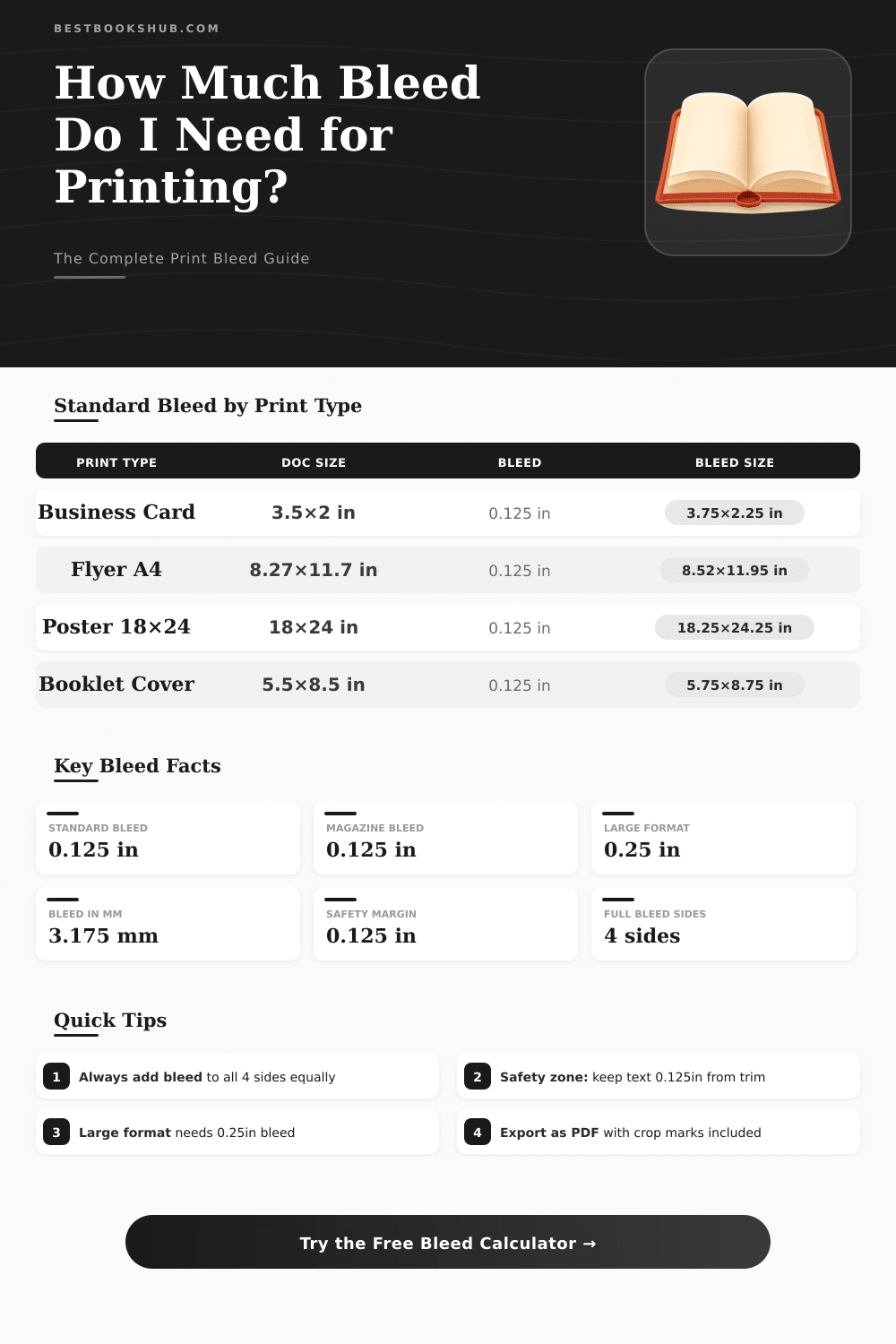
| Print Type | Trim Size (in) | Bleed (in) | Bleed Size (in) | Bleed (mm) |
|---|---|---|---|---|
| Business Card | 3.5 × 2 | 0.125 | 3.75 × 2.25 | 3.175 mm |
| Postcard A2 | 4.25 × 5.5 | 0.125 | 4.5 × 5.75 | 3.175 mm |
| Flyer US Letter | 8.5 × 11 | 0.125 | 8.75 × 11.25 | 3.175 mm |
| Flyer A4 | 8.27 × 11.69 | 0.125 | 8.52 × 11.94 | 3.175 mm |
| Booklet Cover 5.5×8.5 | 5.5 × 8.5 | 0.125 | 5.75 × 8.75 | 3.175 mm |
| Half Letter | 8.5 × 5.5 | 0.125 | 8.75 × 5.75 | 3.175 mm |
| Tabloid 11×17 | 11 × 17 | 0.125 | 11.25 × 17.25 | 3.175 mm |
| Poster 18×24 | 18 × 24 | 0.25 | 18.5 × 24.5 | 6.35 mm |
| Poster 24×36 | 24 × 36 | 0.25 | 24.5 × 36.5 | 6.35 mm |
| Book Cover 6×9 | 6 × 9 | 0.125 | 6.25 × 9.25 | 3.175 mm |
| Bleed Per Side | Add to Width | Add to Height | Total Area Increase | Use Case |
|---|---|---|---|---|
| 0.0625 in (1.588 mm) | +0.125 in | +0.125 in | Min. increase | Tight tolerances |
| 0.125 in (3.175 mm) | +0.25 in | +0.25 in | Standard increase | Most commercial print |
| 0.1875 in (4.76 mm) | +0.375 in | +0.375 in | Moderate increase | High-end litho |
| 0.25 in (6.35 mm) | +0.5 in | +0.5 in | Large increase | Large format, posters |
| 0.375 in (9.525 mm) | +0.75 in | +0.75 in | Wide increase | Wide format / banners |
| Document | Trim Size (in) | Bleed Size (in) | Safety Zone (in) | Trim (mm) |
|---|---|---|---|---|
| Business Card | 3.5 × 2 | 3.75 × 2.25 | 3.25 × 1.75 | 89 × 51 |
| A6 Postcard | 4.13 × 5.83 | 4.38 × 6.08 | 3.88 × 5.58 | 105 × 148 |
| US Letter | 8.5 × 11 | 8.75 × 11.25 | 8.25 × 10.75 | 216 × 279 |
| A4 | 8.27 × 11.69 | 8.52 × 11.94 | 8.02 × 11.44 | 210 × 297 |
| A5 Booklet | 5.83 × 8.27 | 6.08 × 8.52 | 5.58 × 8.02 | 148 × 210 |
| Poster 18×24 | 18 × 24 | 18.5 × 24.5 | 17.5 × 23.5 | 457 × 610 |
Bleed is part of the design that extends past the edges of where the paper will be cut It is the area removed after the printing. It gives the printer a bit of space so that the paper moves naturally during the process. If you do not use bleed, white strips or blank edges could appear on the final piece.
DISCLOSURE: This post may contain affiliate links, meaning when you click the links and make a purchase, I receive a commission. As an Amazon Associate I earn from qualifying purchases.
It is very hard for machines to apply ink until the exact edge of the paper. Basically, print gear cannot print entirely until the edge. Printers based on toner commonly cannot do full bleed, because they depend on electrical charge and rollers that must keep the paper flat.
What is bleed in printing
The only way to create full bleed is to print on bigger sheets and later cut them to the right size.
Files with full bleed are printed on bigger papers, so the colours or images flow without stop until the edge. After the cutting, the bleeed ensures that white edges do not appear in the final document. If a bit of movement happens during the printing or cutting, the natural colour of the paper will not be visible at the edges of the final printout.
The standard bleed area is usually 0.125 inches around the whole paper. For instance, for a document of 8.5 x 11 inches, the template would measure 8.75 x 11.25 inches. After the printing, guillotine cuts those 0.125 inches to reach the final dimension.
Most designers and printers use that standard measure, except in some special cases.
Cutting is not entirely precise, because it can move some millimeters in any direction. If printed elements or backgrounds reach the expected cut line, they must extend a bit more outside to compensate that motion. That is the bleed.
If images go until the edge of the document, they must go also in the bleed area. Simply said, there is no such thing as printing “until the edge”.
Bleed is only an extension of the background or border elements, so it should not carry something important about the content of the page. When you export a file, it helps to include bleed and crop marks, so that the printer exactly cuts the draft. Every important text must stay away from the bleed area.
You use bleed only when the image needs to reach the edges, because those parts will be cut.
Most books do not require bleed. Novels are made up of text blocks that are not close enough to the edges to need it. Even so, if images in a book touch the edge of the pages, bleed becomes necessary.
A bit of attention to those details can make a big difference in the final result of a printeddraft.