📖 Raygor graph-zone lab
Raygor readability estimate calculator
Paste a passage to score a 100-word Raygor sample, count sentences per 100 words, count long words with 6 or more letters, and map the result to a practical grade zone.
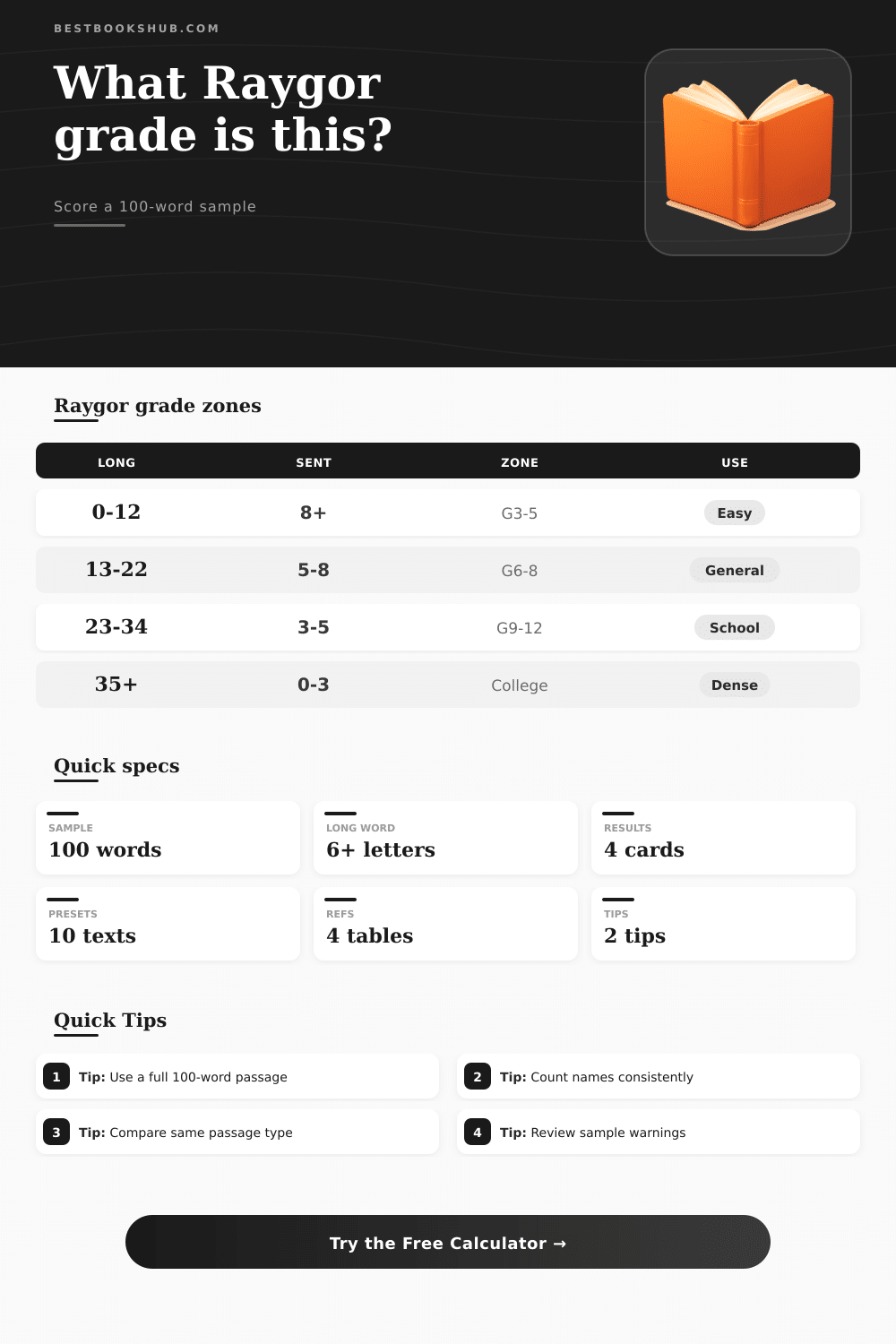
| Proxy zone | Long words per 100 | Sentences per 100 | Typical reader fit |
|---|---|---|---|
| Grade 3 to 5 | 0 to 14 | 7 or more | Simple classroom passages, early chapters, direct instructions |
| Grade 6 to 8 | 13 to 24 | 5 to 8 | Middle grade nonfiction, broad web articles, general explanations |
| Grade 9 to 12 | 23 to 36 | 3 to 6 | High school essays, YA nonfiction, denser book chapters |
| College zone | 32 to 46 | 2 to 4 | Academic introductions, professional reports, complex analysis |
| Advanced edge | 45 or more | Under 3 | Dense specialist prose that may fall outside a stable school grade |
| Step | Raygor-style rule | This calculator option | Why it matters |
|---|---|---|---|
| 1. Select sample | Use a continuous 100-word passage | First, middle, last, or custom start | Different sections can have very different sentence rhythm. |
| 2. Count sentences | Count complete sentences in that sample | Auto partial, punctuation, lines, or manual count | Fewer sentences per 100 words raise difficulty on the graph. |
| 3. Count long words | Count words with 6 or more letters | Names, acronyms, and hyphen compounds can be handled consistently | Long-word count is the main horizontal axis in the estimate. |
| 4. Plot point | Locate sentences and long words on the Raygor graph | Displayed as a graph-zone proxy | The original method is visual, so this tool reports a band. |
| 5. Review warnings | Check if sample is representative | Short samples and edge zones are flagged | Warnings explain when the estimate should be treated cautiously. |
| Warning | Triggered by | Likely effect | Best response |
|---|---|---|---|
| Under 100 words | The pasted passage has fewer than 100 countable words | Counts are normalized and less stable | Paste a fuller passage or compare several samples. |
| Very short sentences | More than 10 sentences per 100 words | Grade may look unusually easy | Check if the passage is dialogue, list text, or fragments. |
| Very long sentences | Fewer than 2 sentences per 100 words | Grade may jump sharply | Manually confirm sentence boundaries and punctuation. |
| Name-heavy sample | Many capitalized long words are found | Names can inflate the long-word axis | Use a consistent proper-noun setting for comparisons. |
| Graph edge | Extremely high long-word count or low sentence count | The result may be outside a normal school-grade band | Read the result as an advanced-zone flag, not a precise grade. |
| Writing type | Common long-word pattern | Common sentence pattern | Raygor note |
|---|---|---|---|
| Early reader | Few words over 5 letters | Many short sentences | Often lands in the lower-left easier zone. |
| Middle grade chapter | Moderate descriptive words | Clear sentence breaks | Usually a central graph point if dialogue is not dominant. |
| News article | Names and civic terms appear often | Medium-length sentences | Proper nouns may need a second pass. |
| Academic abstract | Frequent technical and abstract words | Longer sentence units | Often moves toward the college or advanced edge. |
| Technical manual | Long process terms and abbreviations | Mixed commands and explanations | Use acronym settings and warnings before revising. |
DISCLOSURE: This post may contain affiliate links, meaning when you click the links and make a purchase, I receive a commission. As an Amazon Associate I earn from qualifying purchases.
The Raygor readability estimate calculator lets you enter 100-word sample from your text and measure the probable grade zone for the content. The calculator count long words and sentences within the sample. It plots those counts against a grade level, that way, you get an idea of whether text matches the reader’s ability.
Writing at the right difficulty level give you a better chance of connecting with your reader. They don’t want to be talked down to when the text is too simple. They’ll abandon page when it’s too dense. The Raygor estimate removes any guesswork.
Why You Should Use the Raygor Calculator
It measure two simple factors: How many sentences is found within a hundred words? How many of those word contain six letters or more? Those counts is run by the tool and spit out a score. From there, you’re able to see what grade level your text actualy reaches.
In the Raygor method, it’s not about how many syllables are in a word, it’s about its visual shape. Words that is slower for the eye tend to be long. Shorter sentences speed up understanding, plotting those against each other shows clear patterns quickly. Children’s books tend to be lower on both axes: lots of sentence breaks; fewer long words. College textbooks push hard to the right (longer sentences, more technical vocabulary).
You can test out those intuitions yourself using the calculator. As you’ll see, this goes deeper than everyone thinks. A lot of writers lead with easiest paragraphs, and using the middle hundred words change the picture. It is the same with how you handle acronyms, hyphenated compounds, and names; all these changes the total number of long word in ways that impact the end zone.
There are options for every one of those choices on the tool to make sure the resulting picture shows what you actualy write; whether it’s a technical manual, a middle-grade novel, or a news feature. In real life, people don’t write this way. Their sentences gets longer when they’re having a dialogue. They get shorter during exposition.
That is why we have a set of warning point. It’s going to tell you if your passage is too short, has too many proper name, or is leaning so far out toward an extreme end of the chart that minor adjustments makes huge differences in the score. It keeps writers honest.
Sometimes you might want a very high long-word count for the content. How do you know when it’s time to simplify? When do you know when to let go of your word choice? These are questions only you can answer. And here’s what a lot of writer learn: Their best bits turn out to be two grades above where they thought they were reading. Ouch. But that is a good thing.
Now you realize which words carry weight. Which are the ones that just pad the grade? Now you know that you can yank a whole passage from high school to middle-grade by replacing three wordy words with closer cousins that don’t water down the meaning. That shift wasn’t mandated by calculator. It only reveals the before and after, leaving the choices in your hands.
Each comparison should of be of the same sort of passage. Even within the same book, the descriptive page will differ than the dialogue page. With consistent sampling, the tool is more than just a one-off check. It becomes an editing companion you can rely on over weeks as you develop an internal sense of where you fall on the graph.
Numbers takes second place to feel. A perfect score is not what we should chase with any readability measure. We match the right level to the right audience and refine till ideas flow without friction. That’s when it feels like naturaly speech, when the long words don’t seem showy but necessary. Then the graph just tells you what your ear already told you.
The bottom line: Readability isn’t so much about reaching a number as it is about respecting the reader’s attention. No condescension, just clarity. No confusion, just complexity. They will stay with you long after that final sentence.