⏱ Presentation timing
Presentation reading time calculator
Estimate how long a presentation will take from script words, slide count, speaking pace, pauses, transitions, and question time.
| Speaking pace | Words per minute | Best for | Timing effect |
|---|---|---|---|
| Deliberate | 110-120 wpm | Technical, legal, defense | Longest script time |
| Calm | 125-135 wpm | Teaching and webinars | Easy to follow |
| Standard | 145-155 wpm | Most talks | Balanced pace |
| Brisk | 160-170 wpm | Pitch and updates | Shorter delivery |
| Fast | 175-185 wpm | Rehearsed short talks | Higher risk of rushing |
| Slide density | Extra explain time | Typical content | Planning note |
|---|---|---|---|
| Minimal | 8 sec/slide | One image or quote | Let speech carry the point |
| Light | 15 sec/slide | Simple chart or bullets | Good for short talks |
| Balanced | 25 sec/slide | Text plus visual | Most classroom decks |
| Dense | 40 sec/slide | Table or multi-part chart | Needs slower scanning |
| Technical | 55 sec/slide | Diagram, proof, workflow | Plan pauses carefully |
| Presentation format | Common slide range | Minutes per slide | Q&A pattern |
|---|---|---|---|
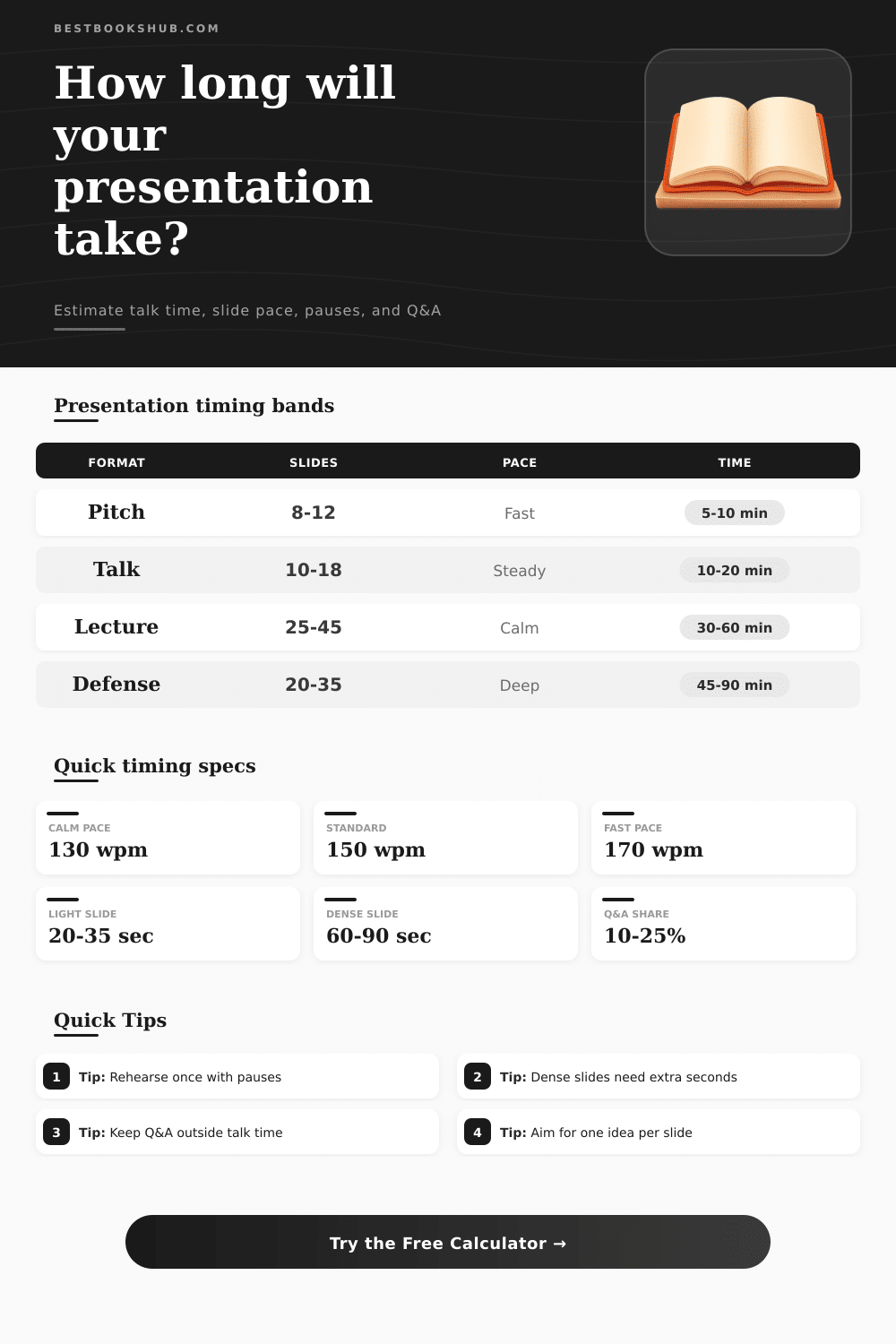
| Pitch | 8-12 slides | 0.4-0.8 min | After the pitch |
| Conference talk | 10-18 slides | 0.8-1.3 min | Short final block |
| Webinar | 18-35 slides | 1.0-1.8 min | Built-in discussion |
| Lecture | 25-45 slides | 1.0-2.0 min | Throughout or after |
| Defense | 20-35 slides | 1.5-2.5 min | Extended questions |
| Timing method | Uses | Strength | Weak spot |
|---|---|---|---|
| Slide outline | Slides x words | Fast early estimate | Misses exact script |
| Full script | Written notes | Best for reading time | Understates visual pauses |
| Hybrid timing | Script plus slides | Most realistic for talks | Needs more inputs |
| Fixed format | Seconds per slide | Works for timed events | Ignores word load |
DISCLOSURE: This post may contain affiliate links, meaning when you click the links and make a purchase, I receive a commission. As an Amazon Associate I earn from qualifying purchases.
There’s nothing like being 3-minutes over your allotted time with the mic about to be pulled from your hands by the moderator before you’ve even finished a sentence. This usually stems from confusion over speaking pace versus reading speed, which almost never match up under pressure. So you wrote out your speech, timed yourself reading it silently, and thought “I’m good.” The reason those timing meltdowns happen is because you thought you was safe. And the problem is that silent-reading speed is much faster then spoken-delivery speed. There’s no breathing or emphasis. There’s no need to stop and think about what’s happening on screen.
When you speak, you’re pausing to let someone laugh, or to give them a second to click through the next slide (or to curse internally if the internet hates you today). To help prevent this, use the calculator below to estimate how much time you will need based off your speaking pace. That leaves us with the speaking pace variable, the core of any good guess. Most speakers greatly underestimate its impact: A normal conversation typically consist of roughly 150 words a minute. But a presentation isn’t a normal chat; if you’re describing complex data or legal language, that rate drop (you’re working through some heavy stuff).
How to Plan Your Time for a Presentation
Here’s where the magic happens: You can set the tool to brisk when you want to make a speedy pitch or choose a steady pace to deliver a more detailed defense of a point. This will adjust final duration accordingly. Although it’s tempting to try to cram in extra material by choosing a faster clip speed, be warned: Speeding up will destroy clarity and cause people to glaze over. Better to prune the words than rush them so fast they sound like an incomprehensible gloop.
Finally, there’s the hidden time-sink of slide complexity, which people frequently overlook in their back-of-the-napkin estimates. A big ol’ image may take 10 seconds to nod through; a multi-part chart/table will force the crowd to parse data and read it carefuly before continuing on. To account for this visual content density, the calculator adds additional seconds-per-slide proportional to its volume of stuff you’re showing. That way, instead of clocking a simple title card along with an elaborate workflow diagram, you know exactly how much time the room should have to view what’s up there. If they don’t get enough time, then whatever you say afterward goes in one ear and out the other, since they’re still trying to make sense of the damn graph.
The other piece that a simple word count doesn’t take into account is how much time is spent interacting with people and pausing. A joke that needs time to land, a planned question, or even a simple poll will add seconds that adds up over the course of your presentation. You can set the type of interaction style, anywhere from light discussion to a workshop-style heavy conversation. Those quiet periods of speaking between key points are also accounted for as the audience takes time to absorb material instead of being bombarded with it. They’re not considered in a speaker speech, but they shouldn’t be ignored, it creates a rushed and tiring listening experience.
To that end, I’ve included some reference tables which should help you benchmark other formats to see how your presentation would compare. An hour-long lecture has far more relaxed guidelines than a five minute pitch, which are very different again from a thesis defense. Slides needn’t be sparse and the speaker needs to keep moving, whereas a defense requires longer pauses and a slower pace to allow for the level of detail being discussed. These presets within the calculator cover these situations, but where it gets interesting is when you tweak those inputs to fit your content. Add a few percentage points for rehearsal buffers if you’re concerned about tangents taking you off course or nervousness slowing down delivery. That’s the margin between running out of time and stopping well clear of the red line.
In the end, it’s not so much about writing down a script but rather giving attention and energy across a set amount of time. If you know how much time, including Q&A, you have, then you’ll know when to pare down to the essentials and pad out most important details. Rather than “eyeballing” things, you’ll know exactly what the math says: will adding this one last example put me over the top? Do I even have time to squeeze it in? The math provides a clear answer, whereas before it was just a hunch. What used to feel like an unclear worry (“Will I run over?”) becomes a solid plan that you’re now in control of. You won’t find yourself at the lectern thinking, “Uh-oh, do I have time?”, you’ll already know precisely how you’re spending each minute. And isn’t that worth every second you invested in preparation?