👓 Reading comfort planner
Eye strain break calculator
Plan eye-rest intervals for reading, studying, and screen work using session length, display type, viewing distance, glare, lighting, blink comfort, and task intensity.
Printed pages
Low screen load, but small type and weak lighting still call for regular distance breaks.
E-ink readers
DISCLOSURE: This post may contain affiliate links, meaning when you click the links and make a purchase, I receive a commission. As an Amazon Associate I earn from qualifying purchases.
Usually gentler than backlit screens, with strain mostly from font size and posture.
Backlit tablets
Closer distance, glare, and brightness mismatch make shorter eye rests useful.
Proofreading
Fine detail scanning has a high visual load even when the display is well adjusted.
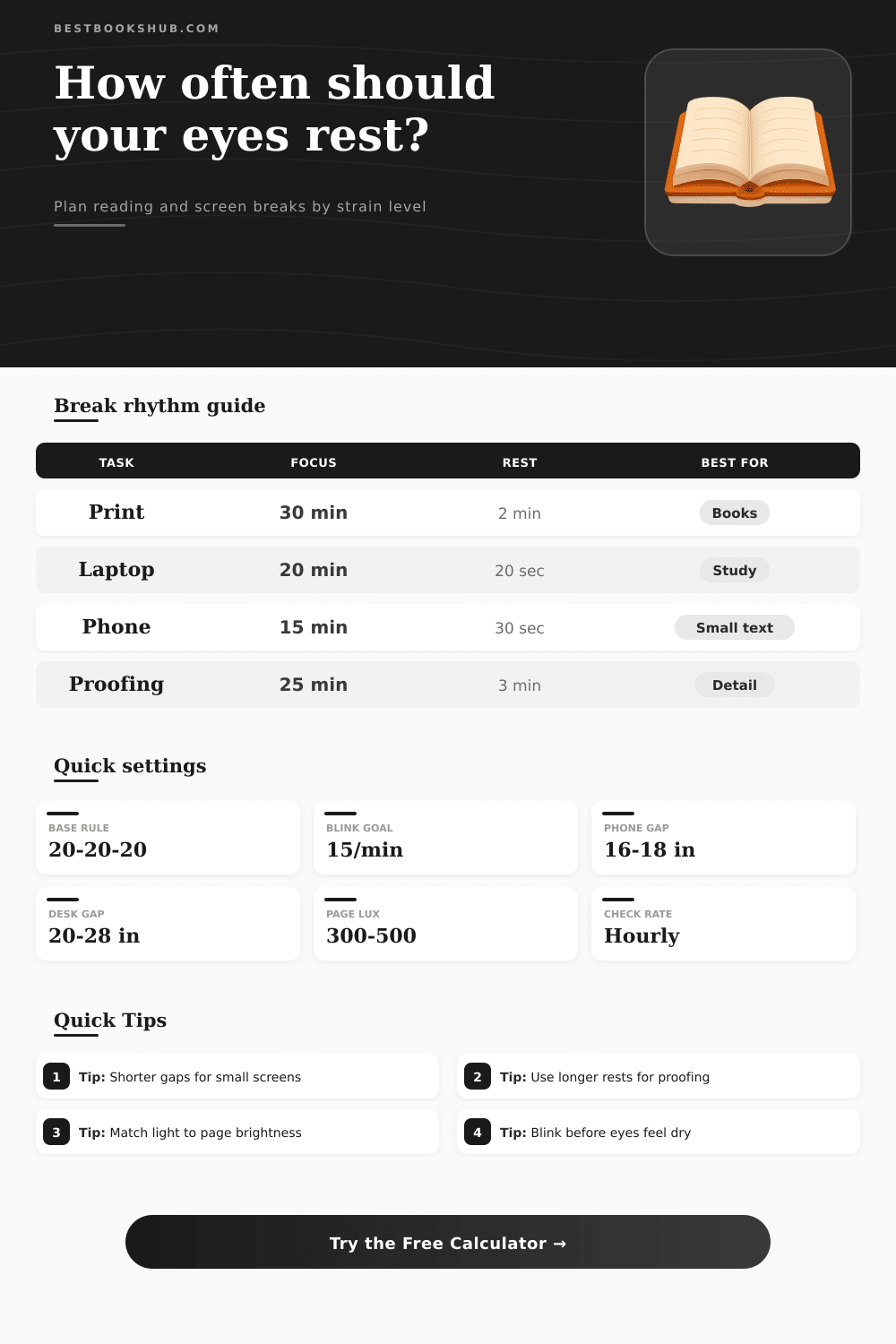
| Rhythm | Focus block | Eye rest | Good fit |
|---|---|---|---|
| 20-20-20 | 20 minutes | 20 seconds distance gaze | Screen reading, research, mixed work |
| Study sprint | 25 minutes | 2 to 5 minutes away from page | Textbook study, note review, exam prep |
| Deep reading | 45 minutes | 5 to 10 minutes recovery | Printed books, long-form reading, low glare rooms |
| Proofing cycle | 15 to 25 minutes | 2 to 3 minutes away from detail | Citations, line edits, copy checks, small text |
| Recovery reset | 60 minutes maximum | 5 to 10 minutes movement | Any setup with fatigue, dryness, or heavy glare |
| Setup | Typical distance | Metric equivalent | Adjustment signal |
|---|---|---|---|
| Phone reading | 16 to 18 inches | 41 to 46 cm | Increase text size if held closer than 14 inches. |
| Printed book | 16 to 24 inches | 41 to 61 cm | Add page light if you lean in to read. |
| Tablet or e-reader | 18 to 24 inches | 46 to 61 cm | Reduce glare when the screen reflects a lamp. |
| Laptop screen | 20 to 28 inches | 51 to 71 cm | Raise text zoom before moving closer. |
| Desktop monitor | 20 to 30 inches | 51 to 76 cm | Keep the top of the screen near eye level. |
| Condition | Comfort target | Break effect | Calculator treatment |
|---|---|---|---|
| Balanced reading light | Page and room feel similar | Normal interval | No added glare or light penalty |
| Dim paper reading | Page needs extra task light | Moderate interval cut | Adds lighting load to score |
| Bright screen in dark room | Room is too dark for display | Shorter microbreaks | Adds mismatch and dryness load |
| Reflected window glare | Visible reflection on page or screen | Shorter focus blocks | Adds mild to heavy glare load |
| Dense detail review | Small marks require close focus | More frequent recovery | Adds intensity load |
| Comfort level | Blink reminder | Session action | Best paired with |
|---|---|---|---|
| Normal comfort | 12 to 15 per minute | Use base rhythm | Balanced light and readable text |
| Mild dryness | 15 per minute | Add a few deliberate blinks at each pause | 20-20-20 microbreaks |
| Moderate dryness | 16 to 18 per minute | Shorten focus blocks and add recovery pauses | Larger font and reduced glare |
| Fast fatigue | 18 per minute | Use shorter cycles and step away hourly | Lower brightness mismatch |
| Contact lenses or dry air | 16 to 18 per minute | Prefer predictable breaks before symptoms build | Humid room and screen distance |
When the words on a page no longer seem like words instead just shapes, you’re experiencing visual fatigue. This is what happens when your mind checks out even though your eyes remains in place. This means your focusing muscles has been clenched for too long. If you ignore the signal, you’ll get headaches (or dry eyes). Taking time to plan rest before you hit exhaustion will keep you productivey.
Plug in your reading equipment into the calculator above and it’ll do all the hard work for you. You don’t have to guess what kind of stress your environment is putting on your eye. It’s not about time alone. Reading a physical book for two hours is different than sitting around on a computer for two hours staring at spreadsheets.
How to Keep Your Eyes Healthy
It’s also about the device. E-ink readers is different from backlit phone screens, which are different from printed pieces of paper. Your eyes gets flooded with light when looking at a backlit display, causing them to become drier and needing more regular break.
Distance also plays a role. Holding a phone at twelve inches puts extra stress on your eye muscles compared to looking at a monitor at twenty-four inches away. That tension compound over time until it catches up with you.
Lighting and glare do far more than distract: They make it hard to focus. You can sit up straight, but when a page is illuminated and the rest of the room is dark or something shiny is reflecting off your computer, it’s a strain for your eyes to keep things sharp. The calculator take those conditions into account as well. Try reading in a dark space with a brightly lit screen (and it suggest shorter focus periods). When there’s mismatched light, the body has to continuously open and close the pupils, burning through energy fast.
To give eye’s ciliary muscles a break, just look at something far away. It’s basic biology, and most of us don’t take a step back until our eyes start straining and we’re forced to squint. Eye strain is another key factor of visual comfort and that involves blinking. When staring at a screen (or reading dense text), we blink much less frequently. Less blinking mean fewer chances to distribute any tears across cornea. This makes it feel gritty. If you spend lots of time in dry air, or wearing contacts, the tool has an adjustment for comfort.
Don’t forget: resting your eyes isn’t the only part of this equation. You also need to intentionally lubricate surface of your eye. Try setting a timer to remind yourself to blink fully every few minutes, it help avoid burn before it begins. A little habit brings big results.
Consider this list more of a starting point for experimenting with what works best for you. For instance, if the calculator recommend stopping every 20 minutes and you feel fine at 30 minutes, follow that advice but be careful. Exhaustion builds up over time. We’re not trying to halt work entirely; we’re aiming for consistant quality over an extended period. Taking a momentary breather avoids the dreaded “I need to take my eyes off the screen for a while to recover” situation.
Don’t run out of the gate, why would you expect your eyes to sprint for hours on end without a reset? Rhythm is the key to preserving your eyesight, not restriction. Early adjustments to your time off and surroundings ensures that reading remains comfortable for you. If things are starting to get blurry, adjust the lighting, bump up the font size or step outside and take in some scenery. Doing so should of preserve your visual comfort.