📖 Paired punctuation analyzer
Curly brace counter
Paste prose, notes, JSON-like text, templates, or manuscript metadata to count opening and closing curly braces, pair balance, nesting depth, and cleanup priority.
The calculator scans character by character, tracks a stack of open braces, then reports paired braces, unmatched positions, depth, density, and context spread.
| Band | Unmatched braces | Max depth | Density signal | Review action |
|---|---|---|---|---|
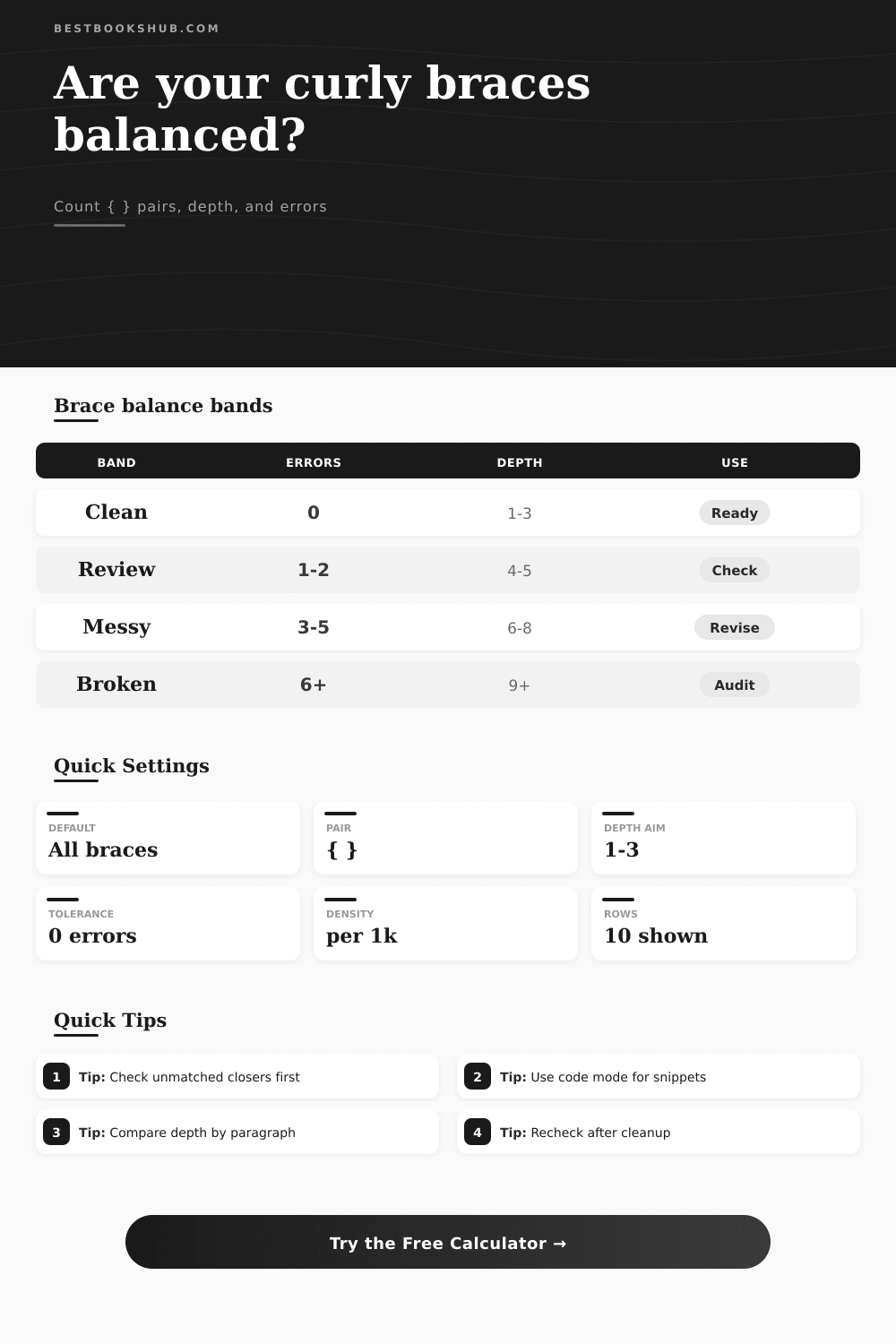
| Clean | 0 | 1 to 3 levels | Expected for notes, templates, and compact metadata. | Keep the structure and proofread content normally. |
| Review | 1 to 2 | 4 to 5 levels | One section may have a missing opener or closer. | Check the listed positions before editing wording. |
| Messy | 3 to 5 | 6 to 8 levels | Brace-heavy text may hide copied markup or broken placeholders. | Work from the first unmatched closer forward. |
| Broken | 6 or more | 9 or more levels | Likely pasted snippet, export block, or malformed template. | Split the sample into smaller blocks and rescan. |
| Text context | Common brace use | Expected pattern | Usual risk | Best scan mode |
|---|---|---|---|---|
| JSON-like metadata | Objects, nested fields, arrays around book data | Many balanced pairs with predictable depth | Missing closer after a copied field | Count every brace |
| Template copy | Placeholders such as {title}, {author}, and {date} | Short single-depth pairs | Half-deleted placeholders | Editorial notes |
| CSS fragment | Selector blocks and media sections | Balanced blocks, sometimes nested by media rule | Extra closer after a pasted rule | CSS or style fragment |
| Citation notes | Curly braces around tags, editions, or import fields | Occasional single pairs | Mixed braces inside quotes | Citation and index text |
| Plain prose | Rare editorial insertion or quoted symbol | Usually zero braces | Accidental pasted markup | Plain prose check |
| Metric | How it is counted | Why it matters | Healthy signal | Warning signal |
|---|---|---|---|---|
| Matched pairs | Closer resolves the latest active opener | Shows usable brace blocks | Pairs equal open blocks | Pairs stop before text ends |
| Unmatched openers | Open braces left on the stack after scan | Usually means a missing closer | Zero after full sample | Open positions at the end |
| Unmatched closers | Close braces that appear without an active opener | Often break templates immediately | Zero in all profiles | Early close position |
| Maximum depth | Highest active stack size during the scan | Measures nested complexity | One to three levels | Depth above target |
| Line spread | Lines containing counted brace marks | Shows whether issues are isolated | Few lines in short templates | Many issue lines |
| Preset type | Typical sample | Brace pattern | Expected result | Useful input setting |
|---|---|---|---|---|
| Clean JSON note | Compact book metadata object | Nested but balanced | High score | JSON-like metadata |
| Template fields | Short placeholders in a blurb | Several shallow pairs | Low depth | Editorial notes |
| Broken metadata | Object missing one closer | Unmatched opener | Review or messy | Count every brace |
| CSS fragment | Style block excerpt | Nested media and selectors | Depth check | CSS or style fragment |
| Plain prose | No intentional braces | Zero or rare marks | Clean if zero | Plain prose check |
DISCLOSURE: This post may contain affiliate links, meaning when you click the links and make a purchase, I receive a commission. As an Amazon Associate I earn from qualifying purchases.
You can simply copy your text and feed it to the calculator (above) which will do math for you. There’s no need to count them by hand. By scanning each character, it keep tabs on openers and closers. Unmatched positions is reported, along with depth of nesting, plus density.
On the surface, this seems simple: did all the braces pair up? Yes or No? Not so fast. How deeply nested is it? That makes a difference too. A flat structure with only one level of nesting are readable. A structure that goes nine levels down is harder to follow then. The tool separates those two scenarios. Then it provide you with a quality score that considers both complexity and balance.
How the Calculator Works
The rules change with the context. A curly brace is an oddity in plain prose. Generally speaking, any non-zero number of curly braces found in a block of text are a red flag indicating either a formatting glitch or a missing placeholder.
If that’s the case, then you’re talking about CSS fragments or JSON-like metadata. In these cases, braces is natively part of the language. That’s why the calculator offers a choice of scan profiles corresponding to content types. These settings tells the tool which pairs of braces matter, and which ones don’t, specifically braces hiding within code spans or quotes. Editors sometimes use this technique when they want to discuss symbol itself instead of using it for structure.
Look carefully at that unique count for closers. If there are unmatched open braces, it’s likely because you failed to close some sort of block at the end of a large section. If there is unmatched closing braces, it means there was a break up higher in the text. That break is what threw everything out of whack. Highlighting those spots on calculator will allow you to locate them. It’s more productive to correct the original mistake than guess at the final one.
This is laid out clearly in bands on the page, and there’s even a reference table on the page that explains all of this. If your structure is clean, then you has a good score. Publish away. If your score is messed up, you probably copied and pasted someone else’s markup somewhere. Strip it out.
Broken text: split it into smaller blocks. Isolate damage. Triaging this way save you time. You’re focused on particular lines where the balance are failing or where depth spikes. You don’t have to sit staring at a thousand lines of text.
Trust comes from structure. Data files and templates has a form or structure. The systems that consume them checks if their data files or templates is well formed. How forgiving are they? Do they just fail? Or do they fail loudly? If you’re trying to submit a file to a database, a developer, or a printer, you don’t want to give them a broken file. Take a moment and quickly scan it first. Save yourself some big headaches.
The tool gives confidence. Know your text is built right. Think of curly braces like the brackets in a parenthesis; they group ideas together. Opening too many without closing will confuse the reader. Closing too many will cause the context to dissapear. A healthy balance means a shallowness that guides the eye but doesn’t require effort.
Adjust the max depth preference in settings; this determines how much complexity you’re willing to tolerate. Smaller favors simplicity. Larger lets you nest more and get rich. How do you like the depth of your notes? Ultimately, it is all about clarity.
Fixing a CSS file is no different than cleaning up a manuscript. The structure supports the content. There is nowhere for the content to stand if the braces don’t balance. Check your foundation with the counter. Do this before you begin building the walls. It’s a small step. It is a step that keeps your work from falling apart.
You should of checked it first.