↵ Line ending scanner
Carriage return counter
Paste text, exports, escaped logs, manuscript files, or CSV rows to count carriage returns, CRLF pairs, lone CR marks, LF-only endings, and mixed line-ending risk.
| # | Ending | Line | Index | Context |
|---|---|---|---|---|
| Load a preset or paste text to show carriage return context rows. | ||||
| Ending type | Characters | Code points | Typical source | Review note |
|---|---|---|---|---|
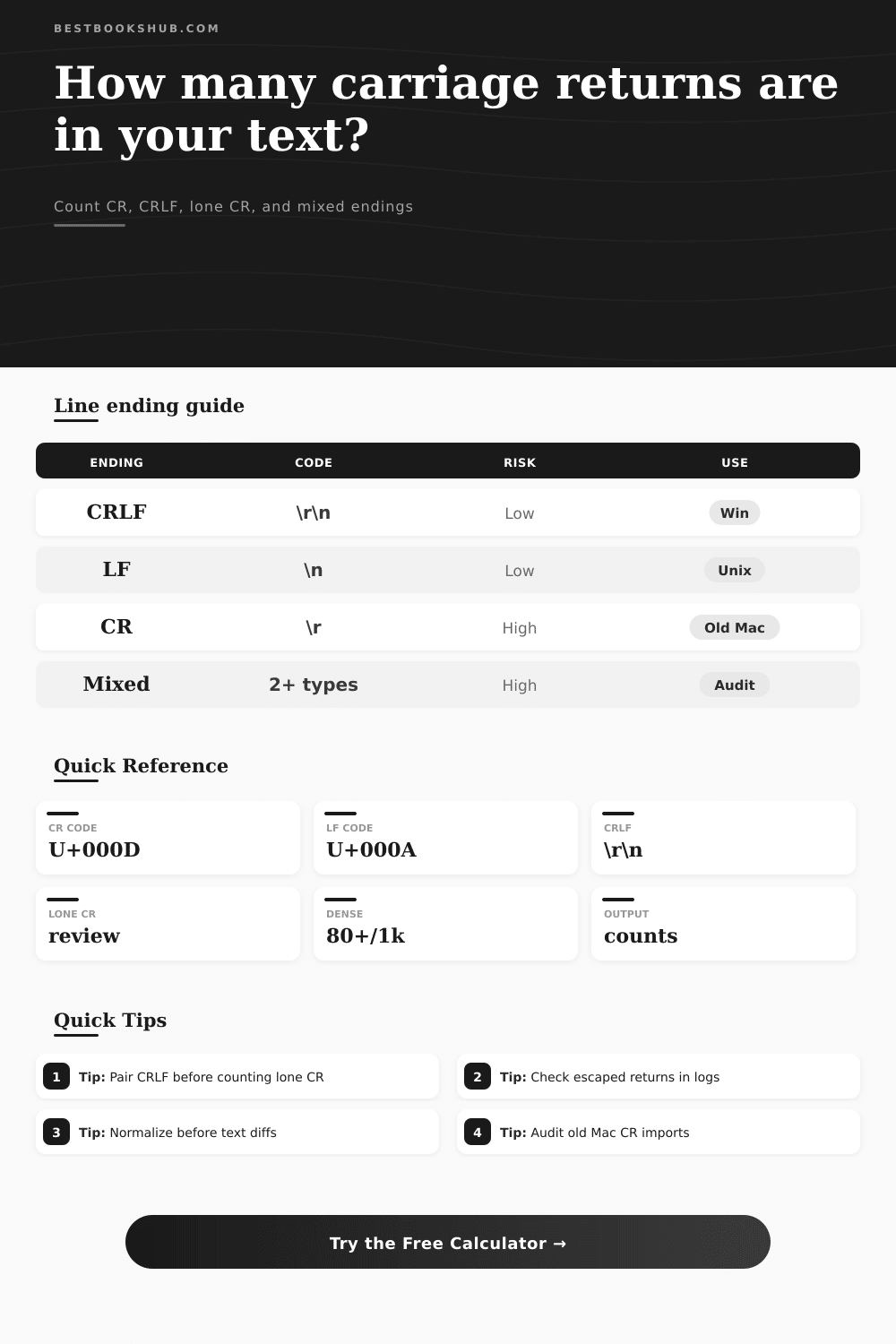
| CRLF | \r\n | U+000D U+000A | Windows editors, many CSV exports | Usually safe when every line uses the same pair. |
| LF | \n | U+000A | Unix, Linux, macOS, Markdown, Git | Common for web text and source-controlled files. |
| Lone CR | \r | U+000D | Classic Mac files, old databases, device feeds | Often worth normalizing before import or comparison. |
| Mixed endings | CRLF + LF | Multiple patterns | Copied text, merged files, generated logs | Can create false diffs and inconsistent line counts. |
| Source profile | Expected ending | CR warning | Best setting | Useful output |
|---|---|---|---|---|
| Windows manuscript | Mostly CRLF | Lone CR above 0 | Pair CRLF | CRLF pairs and lone CR |
| Legacy Mac notes | Mostly CR | Mixed LF marks | Lone CR focus | Old line break count |
| Unix or Git text | Mostly LF | Any CR in source | Mixed diagnosis | CR contamination check |
| CSV or TSV data | CRLF or LF | CR inside fields | Context rows | Import split clues |
| JSON or log string | Escaped notation | Raw and escaped mismatch | Compare mode | Decoded count check |
CRLF paired text
Best for Windows-origin files when every record ends with a carriage return plus line feed pair and no lone carriage returns remain.
LF-only text
DISCLOSURE: This post may contain affiliate links, meaning when you click the links and make a purchase, I receive a commission. As an Amazon Associate I earn from qualifying purchases.
Best for Markdown, code, and web workflows. A nonzero carriage return count may signal pasted Windows or legacy content.
Lone CR text
Classic Mac or device-feed style. It may appear as one long line in tools that expect LF or CRLF breaks.
Mixed-ending text
Most likely to cause noisy diffs, off-by-one row counts, and records that split differently after import or export.
| Goal | Convert from | Convert to | Watch for | Counter check |
|---|---|---|---|---|
| Web publishing | CRLF or CR | LF | Paragraph spacing | CR count becomes 0 |
| Windows CSV | LF or CR | CRLF | Quoted field breaks | CRLF equals row breaks |
| Database import | Mixed endings | One standard | Embedded returns | Lone CR reviewed first |
| Text comparison | Any mixture | LF or CRLF | False line diffs | Mixed score becomes low |
Never seen a carriage return? Chances are good that you’ve never heard one either. But these invisible characters create far more formatting problems than anything else in digital stack. And the issue is, they’re not all the same.
What’s considered a line break in a Python script isn’t the same as a line break in a Word document, which isn’t the same as a log file line break on a server running Linux. Copying text from one environment to another often involves copying over hidden artifacts right alongside the text you see. These artifact alter how your software understands your data, perhaps separating out fields improperly or joining together paragraph into a single chunk.
Why Line Breaks Matter for Your Code
The tool above breaks those differences down for you between lone markers and paired sequences. This way, you can at least try to find where formatting trouble is coming from and see what is realy there.
Why does this matter? Because computers represent lines in one of several ways. Mostly there is three.
The first is a combination that has both a carriage return and then a line feed. That’s what Windows do: it sends both characters. It’s also known as CRLF.
Next there is the line feed alone. That’s what moddern macOS, and Unix and Linux do. It’s known as an LF character.
Then there is just the carriage return. That’s what old Macs did; it goes all the way back to the classics days when Mac didn’t run a Unix operating system anymore. That’s a single CR character.
Most things these days will accept either LF or CRLF without complaining. They’ll even normalize them for you while they’re reading the file. It’s when you get a mixture that gets tricky. The parser will then either fail halfway through a row and give you incorrect-looking results, or conflate two rows together. You end up with what seems like good-looking data, but which won’t work at all inside a database.
This is why the line ending score matters, it’ll let you know whether you have a consistent file or are working with a dangerous mix of protocols.
If you copy some text into the calculator, then you’ll see how it divides up all those characters depending on which mode you’re in. That’s especially useful when viewing log files or working as a developer.
Often, the line breaks is represented as a text string, such as backslash-n and backslash-r, instead of an actual control character. A plain old search won’t find those at all; the computer sees those simply as text characters. Using the interpret mode will “decode” these text representations and count them as though they were real line breaks.
For example, this can be important when debugging. You might scan through a raw log file and not notice any actual control characters, leading you to assume the file isn’t corrupted. However, the escaped notations mean its logical structure has been violated anyway. The tool even shows you this discrepancy by reporting both the raw and the interpreted counts.
Beyond just plain numbers there is another level of insight: understanding density. Noise like a few stray carriage returns in a ten page document may be insignificant. A similar number of stray returns in a short config file may be the whole syntax’s undoing. Establishing a review threshold can distinguish between acceptable variation and problems. In this case, the table provided with the tool lays out the risks.
As shown here, using only CR is a high risk almost everywhere except Windows, while using only CRLF are a low risk on Windows. That informs your prioritization for cleanup tasks. If there are only a few outliers and the dominant style is consistent, you don’t have to correct each individual character.
Usually, people attempt to solve this with search & replace within their text editor. This method would work if you were able to know precisely what to look for. But what about guesses? To visualize a text file usually doesn’t show any distinction between CRLF vs. LF, they both appear as a new line on screen. And the only way to confirm something is to either visually inspect the binary structure or use a special tool for that purpose. The calculator shows you how to do the second step without opening a hex editor.
You get context lines surrounding each match found to show if a line break should of really be there. A Return character somewhere in the middle of a sentence is probably wrong. But a Return at the end of the last paragraph could very well just be the native style of your system.
These characters have their roots in the era of the typewriter. The line feed moved the paper one line forward. The carriage return sent the print head back to the left margin. This mechanical division carried over into computers. And different operating systems decided whether they would keep both signals or let one drop out. For compatibility reasons, Windows kept them both. Unix got rid of the return; it was redundant. Mac went for simplicity and kept only the return at first. There’s nothing wrong with any of those decisions. They simply chose differently.
When you bring together files from different sources, you introduce variance. Combine a Unix log with a Windows export every time, and there’s a good chance you’ve created a mixed-ending nightmare.
Once you have identified the problem, fixing it is typically easy. For example, normalizing the text (making sure that all lines end with same character) usually solves the issue. Use LF for cross platform or web content. If you are in a strictly Windows world, use CRLF.
You can see what will be done before doing anything by previewing the normalization in the tool. This is a critical step to prevent accidentally losing data.
It may happen sometimes that what looks like a carriage return is actualy not a line break. Depending on the format in which the data exists, it might be part of the data itself (a newline embedded inside a quoted string, for instance). Blindly removing it would then corrupt the data. Lastly, check the context to make sure you don’t mistake meaningful characters for structural breaks and remove them.
Perfection is not the goal here. Consistency is.
If every line ends with a mix of characters, then you have a file which at some point will result in errors. If every line ends with one specific type of ending (either LF or CRLF), then that’s predictability. Software runs on predictability. The calculator exposes this layer of your text so that you can make it predictable. It makes the errors that we don’t see visible. Then, when you see them, you know how to fix them. You no longer have to guess. Instead, you know exactly what character is causing an error. And that difference. Knowing instead of just guessing, is well worth the several seconds it takes to study the text.