💬 Subtitle timing lab
Reading speed for subtitles calculator
Paste a subtitle cue and compare its words per minute equivalent, characters per second, viewer reading band, and minimum readable duration.
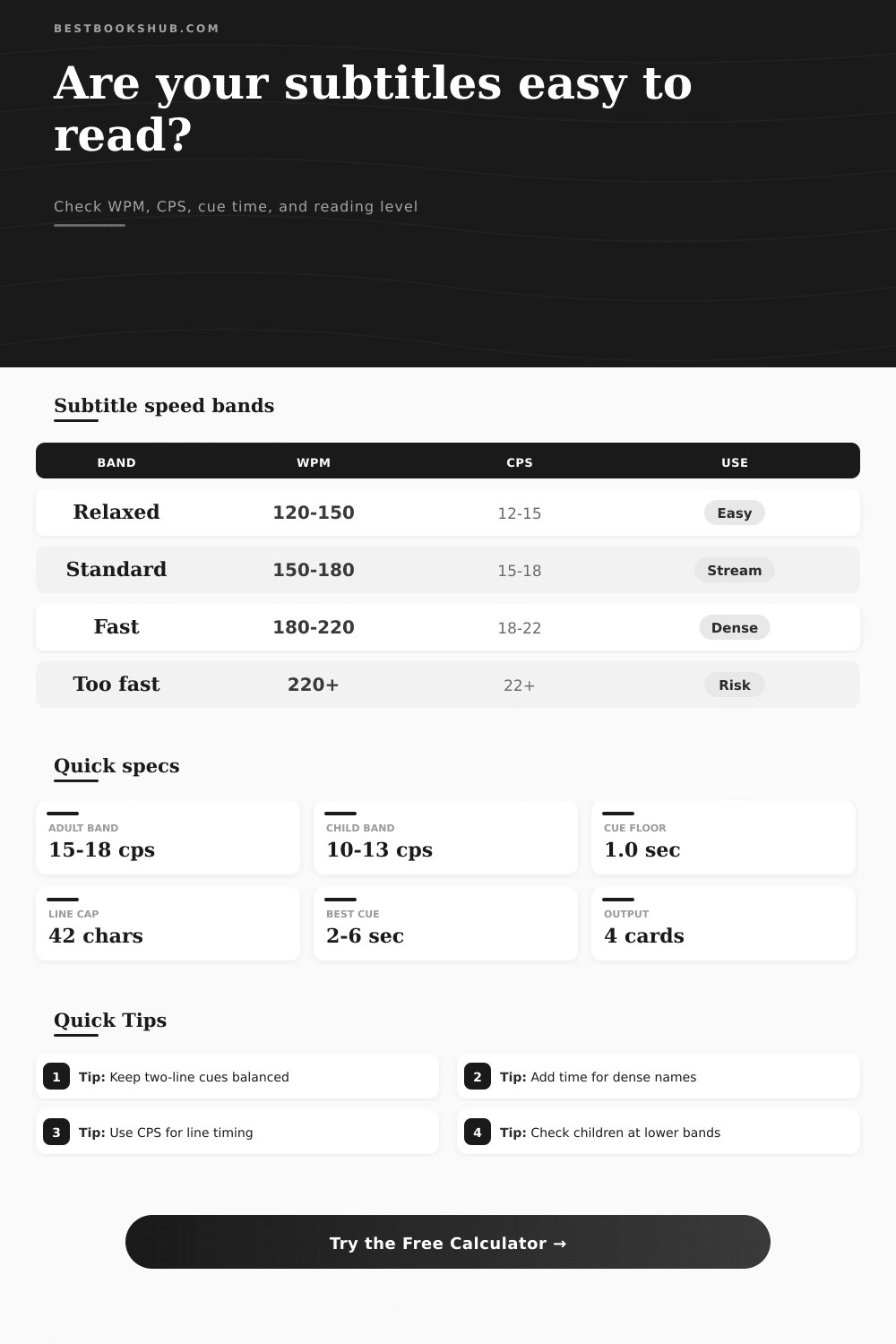
| Band | WPM equivalent | CPS range | Best fit |
|---|---|---|---|
| Accessibility first | 100-130 WPM | 10-13 CPS | Children, accessibility review, dense visuals, and viewers who need more time. |
| Relaxed reading | 120-150 WPM | 12-15 CPS | Drama, quiet dialogue, educational scenes, and subtitles with important visuals. |
| Streaming standard | 150-180 WPM | 15-18 CPS | General entertainment subtitles for adult viewers and ordinary dialogue. |
| Broadcast caption | 160-200 WPM | 16-20 CPS | Live-style captions, interviews, and non-fiction speech with steady pacing. |
| Fast dialogue | 180-220 WPM | 18-22 CPS | Rapid exchanges, comedy timing, action dialogue, and compact translation cues. |
| Viewer level | Comfort CPS | Comfort WPM | Timing note |
|---|---|---|---|
| Young readers | 9-11 CPS | 90-115 WPM | Use short wording, fewer line breaks, and longer holds for each cue. |
| Children and family | 10-13 CPS | 100-135 WPM | Keep sentence structure simple and avoid rapid cue turnover. |
| Teen viewers | 12-16 CPS | 120-165 WPM | Moderate pacing works when line length stays balanced. |
| General adults | 14-18 CPS | 140-185 WPM | Good default band for streaming subtitles and translated dialogue. |
| Experienced subtitle users | 16-21 CPS | 160-220 WPM | Usable for fast dialogue when cues are visually clean and not too dense. |
| Technical or dense content | 12-16 CPS | 120-165 WPM | Lower the target when terms, names, formulas, or numbers slow recognition. |
| Cue length | Relaxed capacity | Standard capacity | Fast capacity |
|---|---|---|---|
| 1.5 seconds | 18-22 characters | 23-27 characters | 28-33 characters |
| 2.0 seconds | 24-30 characters | 30-36 characters | 36-44 characters |
| 3.0 seconds | 36-45 characters | 45-54 characters | 54-66 characters |
| 4.0 seconds | 48-60 characters | 60-72 characters | 72-88 characters |
| 6.0 seconds | 72-90 characters | 90-108 characters | 108-132 characters |
| Format | Speed adjustment | Line concern | When to slow down |
|---|---|---|---|
| Standard dialogue | Base target | Natural phrase breaks | Slow when action competes with reading. |
| SDH captions | Minus 8 percent | Speaker labels and sound notes | Slow when labels, music notes, or sound effects share the cue. |
| Translated subtitles | Minus 5 percent | Condensed sentence structure | Slow when names, idioms, or unfamiliar syntax appear. |
| Lyric or karaoke timing | Minus 12 percent | Beat-matched line changes | Slow when the viewer must follow rhythm and words together. |
| Lecture captions | Minus 10 percent | Terms, numbers, and definitions | Slow when the cue carries learnable information. |
DISCLOSURE: This post may contain affiliate links, meaning when you click the links and make a purchase, I receive a commission. As an Amazon Associate I earn from qualifying purchases.
How many times have you seen a film with subtitles scrolling so fast that by the end of the line you’ve only managed to read the beginning and the end? The text dissapears under your eyes while they is trying to get comfortable tracking it. And no, it’s not your speed-reading problem alone. It is partly due to how long the lines stays on screen. It also depends on how much you has to focus to keep up with visuals.
But how does this work? Why should you care about logic behind the calculator (which does all the math for you anyway)?
Why Subtitle Speed Matters for Viewers
CPS (Characters Per Second), is the top metric because it’s the most effective way to show visual density. Word count is a good estimation; however, characters gives you a closer look at how much space a subtitle occupies horizontally. For example, two short words occupy less horizontal space different than one long word, which means your eyes has to travel farther to take in that word. If you copy-paste a subtitle cue into the calculator and get a higher CPS result, then it’s likely to be physically dense on-screen and require longer on-screen time to read.
Adults who watch a lot of subtitled content develops a kind of subtitle stamina. More experienced watchers can tolerates faster subtitles without any trouble. Newbies and children is better served with a little breathing room. You can set a profile on the tool that selects target bands based off your viewer type. If you are targeting kids or other newbies, it is best to aim for more relaxed band. This way, they don’t feel rushed while watching the story. They can just enjoy what is happening instead of racing against clock.
And then there’s the matter of timing, which also depends on context. Proper nouns, technical terms, anything with special meaning. These will takes longer than a typical dialogue cue. They are more difficult for brain to process. By increasing the density of your text in the calculator to account for them, it’ll recommend longer speaking times. This makes sure you don’t make common error of treating a complicated sentence like a casual greeting.
And then there’s cue duration. If a subtitle flashes on screen for less than a second, it is basically invisible to most people. Why? Because the eye has a physical limit as to how quickly it can focus and scan. Two seconds is typically floor here for any kind of meaningfully displayed text. As the page makes clear in its reference table, the longer the time, the greater number of characters that can be included. Obviously, a six-second cue can accommodate much more text than a two-second one, but you seldom require all that room. Make cues short rather than stretching them out just to make them readable.
There’s also question of format tweaks. Adding speaker labels or other descriptions (such as sound effects) adds visual clutter. To account for that, the tool suggest slower speeds for education videos or SDH captions. These contain more info on each screen. This requires more time for the viewer to process not just what’s said but how it relates to the rest of conversation. When people don’t make that tweak, they end up missing out on key parts because they’re scrambling to catch up with text on-screen.
In conclusion: good subtitles are invisible. They’re timed just right. The viewer reads them and understands what’s being said on screen without even realizing how hard you would of had to work to make it all happen. The words feel natural; they feel like a part of watching the movie.
If the timing isn’t right, though, those same words becomes a problem. The viewer has to think about them. Their attention shifts from the visuals to the written word and they grow frustrated. By testing your cues with a tool such as this calculator, you ensure that the speed at which the viewer can read matches the level of difficulty found in the content itself.
Guesswork becomes a precise craft. Viewers stay engaged. You get the pacing right. The story plays out exactly as you planned. Clarity is always the objective and getting the numbers right will help you do that better then anything else.