💼 LinkedIn feed fit
LinkedIn post character checker
Check a LinkedIn draft against the 3,000-character cap, preview the first-line hook, estimate mobile truncation, and audit hashtags, breaks, and professional tone bands.
Brief Update
Short status, news, or quick professional note with one clear point.
120-600 charsCrisp Expert
DISCLOSURE: This post may contain affiliate links, meaning when you click the links and make a purchase, I receive a commission. As an Amazon Associate I earn from qualifying purchases.
Practical insight with enough context to feel useful without becoming an essay.
300-900 charsStory-Led Post
Problem, turn, lesson, and takeaway with room for a stronger narrative arc.
900-1,900 charsLong-Form Note
Deep reflection or analysis that must earn every line before the cap.
1,900-3,000| Band | Character range | Reader experience | Best action |
|---|---|---|---|
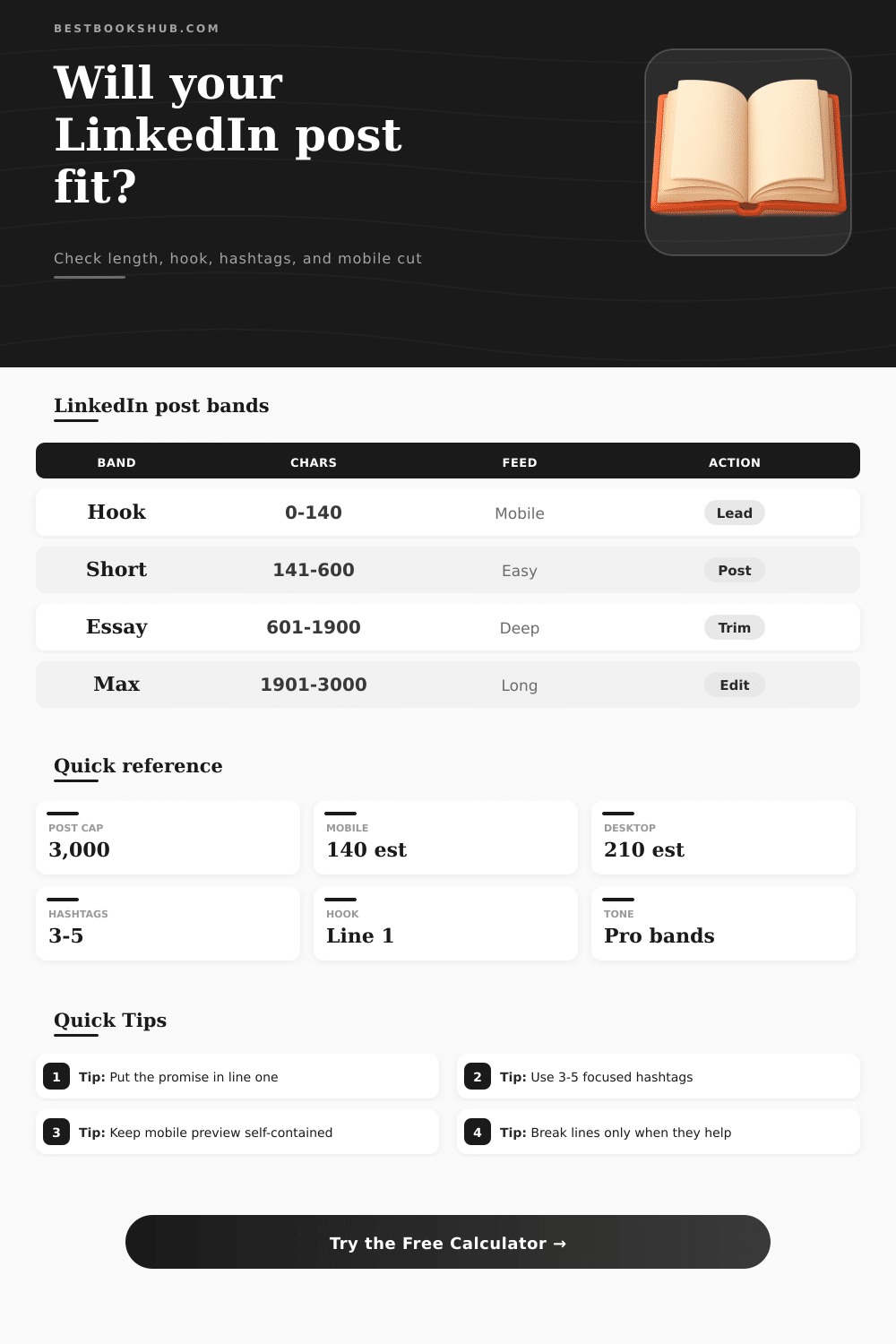
| Hook zone | 0-140 | Mobile preview | Lead with the point |
| Short post | 141-600 | Fast scan | Keep one idea |
| Professional essay | 601-1,900 | Deeper read | Use clean breaks |
| Near cap | 1,901-3,000 | Long commitment | Trim or split |
| Preview area | Default estimate | What it checks | Drafting move |
|---|---|---|---|
| First line | Line 1 | Hook clarity | Promise the value |
| Mobile feed | 140 chars | Small-screen cut | Finish the thought early |
| Desktop feed | 210 chars | Wider feed cut | Set context fast |
| Full post | 3,000 chars | Posting ceiling | Reserve CTA space |
| Hashtag mode | Target | Signal | Use when |
|---|---|---|---|
| Minimal | 0-2 | Clean copy | Personal updates |
| Focused | 2-3 | Topic clarity | Expert posts |
| Balanced | 3-5 | Search context | Most business posts |
| Overloaded | 6+ | Clutter risk | Trim tags |
| Tone band | Target length | Line pattern | Professional feel |
|---|---|---|---|
| Brief update | 120-600 | 1-3 breaks | Direct |
| Crisp expert | 300-900 | 2-6 breaks | Useful |
| Story-led | 900-1,900 | 5-12 breaks | Reflective |
| Long-form | 1,900-3,000 | 10+ breaks | Deliberate |
Most people don’t read beyond the first sentence of a LinkedIn post. When I see it in my feed, I’ll skim over it and within seconds make up my mind about reading further. It’s that first line, typically limited to 140 characters on mobile; that will give your thought a shot. The rest of your text isn’t seen until someone taps “see more.”
How do you write copy when you know actualy how much space you have? LinkedIn is like an extra-long version of Twitter for most pros: they’ll post a couple of paragraph and see if the algorithm rewards them. It’s not that simple. There are actually two limits, LinkedIn lets you go all the way to 3,000 chars, but the feed chops it off sooner on mobile. So if you don’t finish your initial promise by then people think you’re trailing off and move on.
Tips for Writing on LinkedIn
Use this calculator to play within those unseen constraints without guessing. It’s not all about length. Sometimes a 450 character crisp bit of insight beats a rambling 2,200-character essay because the hook is there.
It’s about three things: Does the first line clearly convey value? Do you respect reading pauses on small screen? How many hashtags are competing with your content for eyeballs? Desperate feeling posts has too many tags. Posts with too few tags lose the gentle discovery boost LinkedIn gives relevant topics.
Fewer words is more important then most writers let on. Even if you have what seems like a reasonable word count, walls of text are fatiguing. Thoughtful white space signals hierarchy while providing a breather for eyes. Break up to frequently, however, and the post becomes fractured. That sweet spot exists somewhere between conversational flow and intentional white space.
And here’s where it gets tricky: getting it right depends based off your objective. You need a different kind of breathing room to write a quick career update then you do to write a reflective piece on being a founder. This is where tone bands comes in. Some posts are best served by being direct, purposeful, and brief. Others allow for a slower unfolding of the story.
Where we tend to run into trouble is if writers choose the wrong tone for how much they have written. If it’s a long post and doesn’t develop a narrative arc then it feels padded. If you try to make a short post sound profound, it often ends up feeling vague. Avoiding this mismatch means matching our intention with what people see on screen.
Use hashtags sparingly. That’s where they remain effective. A couple well-thought-out selection provide context. But don’t shout “look at me.” Consider hashtags metadata, not decoration. Go overboard and your post reads like something a growth hacker wrote in 2017. Use ’em gently as hints for those who happen to be looking for such things, not as performance juice.
And industry after industry, we see the same mistakes made over and over again. On line four, they bury the lead. They don’t save room for a compelling call to action. They think that the desktop preview and the mobile one is equivalent. Sometimes it’s more than seventy characters‘ worth of difference.
Even if technically you’re within the character limit, each mistake reduces number of people who will read what you’ve written. Writing for Twitter isn’t about mastering new skills; it’s about applying old ones by keeping constraints in mind from the very start. Make the promise on line one. Complete the core thought before mobile cutoff. Earn each succeeding paragraph thereafter.
When you respect how people naturaly engage with what you write, then you’ll find that the character limit doesn’t feel like a ceiling so much as a useful design brief. Get the opening right and the rest of the post has permission to breathe. This one disciplined habit makes all the difference between posts that scroll past, and posts that stop thumbs and start conversations.