¶ Paragraph symbol audit
Pilcrow frequency calculator
Paste manuscript notes, HTML copy, OCR text, or exported proofs to measure pilcrow marks, paragraph coverage, entity noise, and cleanup priority.
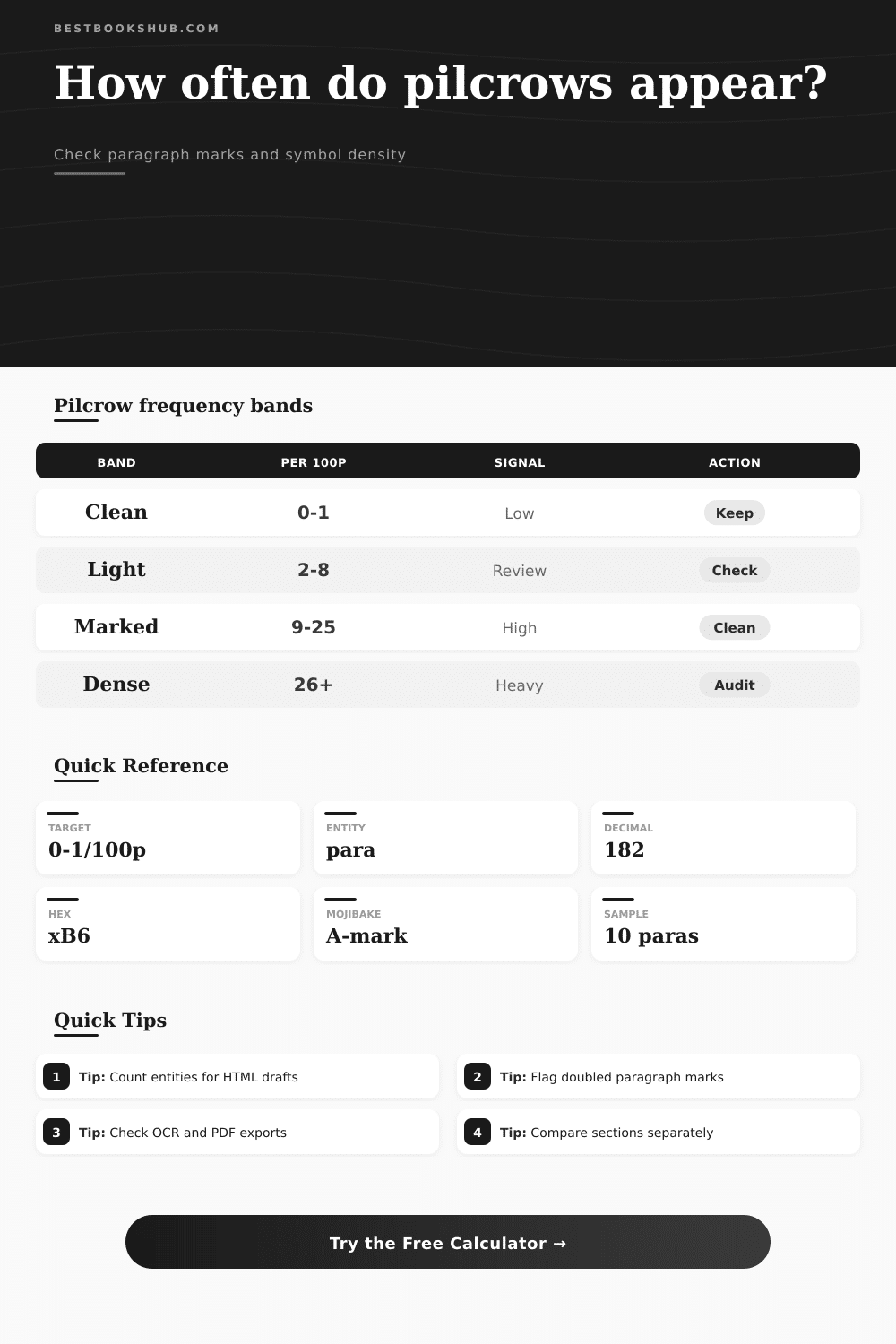
| Band | Pilcrows per 100 paragraphs | Typical signal | Best review action |
|---|---|---|---|
| Clean | 0-1 | Finished reading copy or lightly marked proof | Keep unless the mark is unintended |
| Light | 2-8 | Occasional visible paragraph marker | Check locations before export |
| Marked | 9-25 | Proofing symbols or paragraph-boundary markup | Review clusters and entity strings |
| Dense | 26+ | Layout proof, copied control display, or cleanup issue | Audit before publishing or importing |
| Source text | Expected pilcrow use | Count mode | Review focus |
|---|---|---|---|
| Clean manuscript | Usually none | Visible only | Accidental marks |
| Tracked proof | Paragraph boundary notes | Standalone markers | Leading and trailing placement |
| HTML export | Entity strings in source | Visible plus entities | ¶, ¶, and ¶ |
| OCR extraction | Noisy copied symbols | Encoding artifacts | Mojibake and repeated runs |
| Page-layout proof | Intentional paragraph marks | Any placement | Density and cluster position |
| Detected form | What it means | Example text form | Cleanup note |
|---|---|---|---|
| Visible symbol | Actual Unicode pilcrow | U+00B6 | Usually removable in final prose |
| Named entity | HTML paragraph sign entity | ¶ | Decode or leave only in source samples |
| Numeric entity | Decimal HTML entity | ¶ | Often appears in exported snippets |
| Hex entity | Hexadecimal HTML entity | ¶ | Normalize before visual proofing |
| Encoding artifact | Misdecoded pilcrow bytes | A-mark | Fix character encoding upstream |
| Placement pattern | Signal | Risk | Best use |
|---|---|---|---|
| Standalone line | Manual proofing marker | Can create blank paragraphs | Proof comparison |
| Leading marker | Paragraph starts flagged | May leak into final text | Layout troubleshooting |
| Trailing marker | End-of-paragraph display | May confuse sentence scans | Word-processor exports |
| Inline marker | Embedded symbol in prose | Highest cleanup priority | OCR and copy-paste audits |
| Doubled run | Repeated boundary markers | Possible conversion artifact | Bulk cleanup pass |
Visible-only scan
Best for pasted manuscripts where the actual pilcrow character appears in the editor or proofing view.
Entity-aware scan
DISCLOSURE: This post may contain affiliate links, meaning when you click the links and make a purchase, I receive a commission. As an Amazon Associate I earn from qualifying purchases.
Best for HTML source, CMS fields, and escaped snippets where the paragraph mark is stored as text.
Encoding cleanup
Best for PDF and OCR exports where a visible pilcrow may arrive as a misdecoded two-character artifact.
Standalone markers
Best when only paragraph-boundary symbols should count and inline decorative marks should be ignored.
You may have seen the pilcrow before. Maybe you didn’t realize what it was called. If you haven’t, here’s a picture: That’s a pilcrow (curly P + a line through it).
And yes, that’s a paragraph mark. That’s what we use to start a new thought. That’s what we put when the sentence gets kicked over or when we need to lay things out different. But that’s not what we want in our final copy.
Why You Should Remove Pilcrow Symbols
This symbol indicates something went wrong in the conversion process. This symbol indicates an encoding disaster. This symbol indicate a bad export. The number of those symbols left over after your conversion tell you whether you have a mess or a clean manuscript.
But sometimes, as with these marks, there’s no guarantee that what you see is actualy what you get. That one pilcrow on a page of legal text could be a typographical error. It might even go unnoticed. And those twenty pilcrows on a scanned image? It look like noise. Live with it.
But context matters: Pilcrows in a book are one thing; pilcrows in a scanned book are another; pilcrows in an OCR’d version yet another… In each case, you can’t just say “there are pilcrows here.”
The calculator does the math for you. It translates a fuzzy feeling of messiness into an actual number. Tallies up number of actual symbols you see. And then goes hunting for the invisible ones. These include numeric codes (e.g., ¶) and HTML entities (¶). Which may display in your browser but remain unseen. These can cause havoc in a print layout or a database.
Even spots encoding artifacts, which is garbled strings that crop up when a file passes through different systems. Where’s your text coming from? If you’re grabbing it off a page through OCR, you have a pretty noisy input. The scanner is seeing shapes, and shape doesn’t equal meaning. Often it’ll be confused and turn the pilcrow into some random letter, or even worse, a broken character.
That’s when you need a tool that knows how to handle encoding artifacts. Tool isn’t simply looking at the clean Unicode character. OTOH, if you’ve edited a document with tracked changes in Word, then the paragraph marks are meant to stay there till export time. You want to know they’re there. You want to count around them. With this kind of thing, you can set the tool’s counting mode to show what’s real. Hunt for either the hidden code or the visible clutter.
Why does this matter? Different errors carry different levels of consequence. Seeing a pilcrow on your published blog post are embarrassing. It’s a sign of a formatting fail. A hidden HTML entity for the pilcrow in a CMS field is a security risk. It can throw off the page structure. It can confuse screen readers. It can throw off the page structure. Confuse screen readers.
The calculator draws those lines. It provides a cleanup order that makes sense. It tells you whether or not you’re staring at something that’s a minor proofreading issue. It tells you whether or not you’re staring at a major data hygiene crisis.
Special characters aren’t created equal. Most folks would assume that they are. They’re not. A pilcrow’s purpose is to indicate boundaries. If it’s present in line within a sentence, it’s almost certainly wrong. It doesn’t belong there.
The table on the page makes that clear and establishes correlations between document type and density. There are almost none for clean reading copies. There are many for layout proofs. The trick is understanding what bucket your text belongs in before hitting publish.
Consider also the cluster effect. Where there is a widespread problem, Pilcrows don’t often crop up alone. They likes to cluster together. They appear particularly at transition points between headers and section breaks.
That’s where this calculator checks for clustering. It provides a way for you to specify how large an area is considered a heavy run. And it allows you to pinpoint quickly the nasty bits of your document. Focus on the heaviest hitting areas. You don’t have to scour each page.
Ultimately, the goal is invisible structure. You want paragraph breaks to occur without any announcement whatsoever. Editors use the pilcrow as a handy tool. Readers hate it. How often it occurs in a given piece of writing show how close the work is to its final form. It also shows how far away it is from being shipped.
Keep the pilcrow out of the finished text. Make the structure speak for itself. That’s when you know that you should of truly cleaned up the mess.