| Delimiter and table symbol tool
Pipe character counter
Paste Markdown tables, catalog notes, metadata exports, code snippets, or manuscript text to count pipe characters, escaped pipes, table rows, uneven columns, and delimiter density.
The calculator scans each line, classifies pipes as table separators, field delimiters, escaped literals, code operators, or prose artifacts, then checks density and row consistency.
| # | Line | Type | Pipes | Cells | Context |
|---|---|---|---|---|---|
| Pipe context rows appear after calculation. | |||||
| Band | Pipe density | Common source | What to check |
|---|---|---|---|
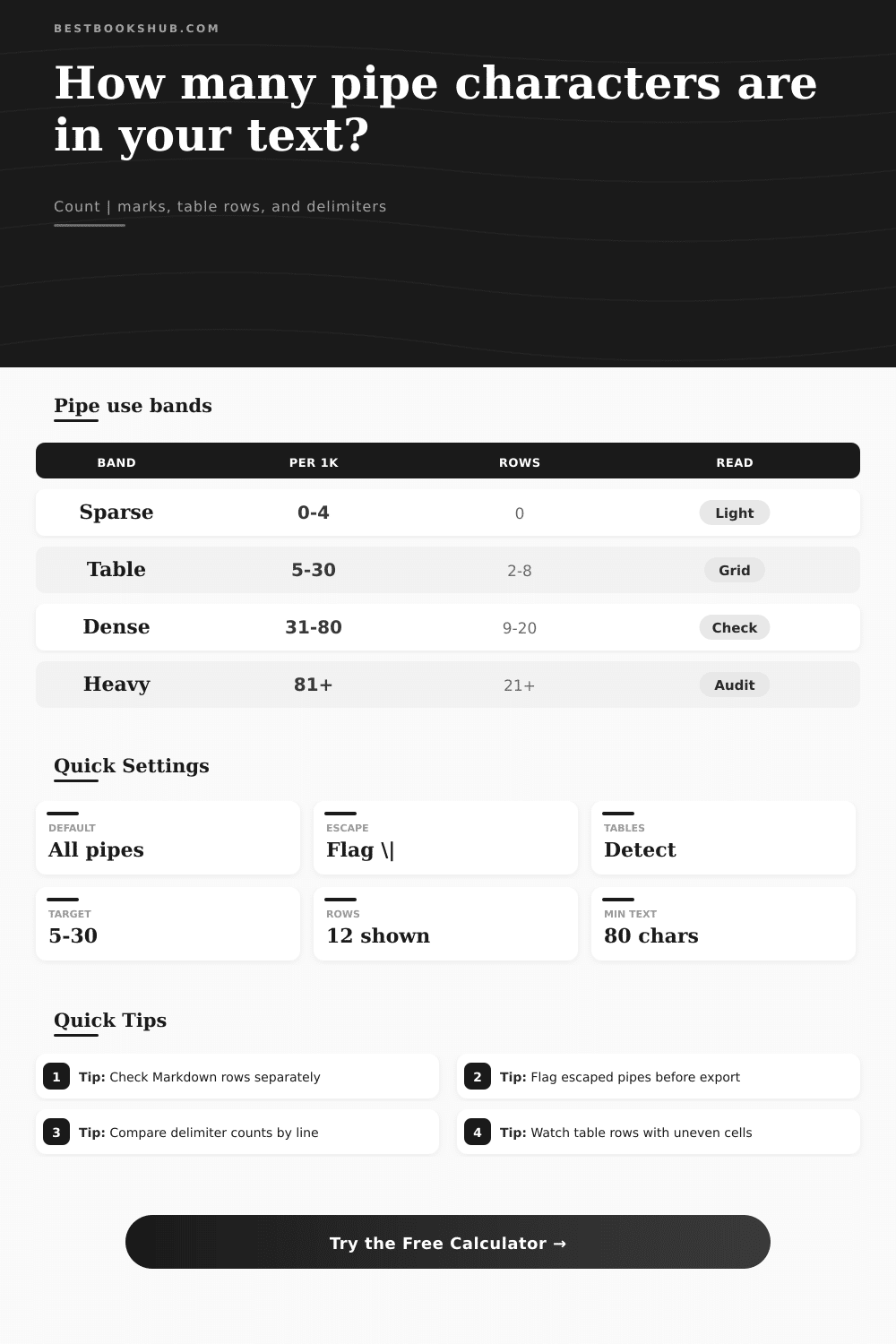
| Sparse text | 0-4 per 1,000 characters | Plain prose, editor notes | Unexpected leftover delimiter marks |
| Mixed notes | 5-30 per 1,000 characters | Catalog fields, quick outlines | Escaped literal pipes and field order |
| Table draft | 31-80 per 1,000 characters | Markdown comparison tables | Header divider and cell count consistency |
| Delimiter audit | 81+ per 1,000 characters | Exports, logs, structured imports | Whether pipes are separators or text content |
| Pipe role | Detection clue | Best mode | Review signal |
|---|---|---|---|
| Markdown table separator | Multiple pipes on neighboring lines | Table pipes only | Uneven cells or missing edge pipe |
| Field delimiter | Repeated single-line record separators | Delimiter pipes only | Different pipe count in similar records |
| Escaped literal | Backslash before the pipe mark | Unescaped pipes only | Literal title text may need protection |
| Code operator | Regex, shell, or language syntax nearby | Count every mark | Operator pipes should not be edited as prose |
| Prose artifact | One stray pipe in normal sentences | Ignore plain prose artifacts | Usually a paste or OCR cleanup issue |
| Sample type | Typical pipes | Typical rows | Useful check |
|---|---|---|---|
| Three-column Markdown table | 12-24 | 4-8 | Each row keeps the same cell count |
| Book metadata export | 20-60 | 5-15 | Records share a delimiter pattern |
| Bibliography import notes | 8-30 | 3-10 | Titles with literal pipes are escaped |
| Regex or command block | 2-18 | 1-6 | Pipes are classified as syntax, not table cells |
| Plain prose cleanup pass | 0-2 | 0 | Any remaining pipe mark gets reviewed |
DISCLOSURE: This post may contain affiliate links, meaning when you click the links and make a purchase, I receive a commission. As an Amazon Associate I earn from qualifying purchases.
The one that probably comes to mind for most people is the pipe character. That is the one beside backslash key on keyboards. However, that is not what it used to do. It was originaly used in Unix shells to string together commands. Now, it’s primarily used as a column delimiter in data exports and in things like Markdown tables.
It helps keep your columns distinct, but when there are hundreds in a document, then it starts to become a nuisance. You can’t count it by hand without making mistakes; use the calculator above to let it crunch the numbers for you instead. That way, you don’t have to stare at the text to spot your missing delimiter.
Why Counting Pipes is Important for Clean Data
And it’s not all about appearances… The consistency of the pipes matter too. Because a single rogue pipe on your page means that if you imported some data into a spreadsheet or CMS, suddenly all the columns will be offset by one cell in the title field and the whole thing falls apart. You don’t want to mess up how it is built. Why? A broken table doesn’t work. It’s about functionality.
Is it a table separator or an escaped literal? For example, if you’re reviewing Stephen Hawking‘s book “A Brief History of Time | The Movie”, that pipe is part of your content. It needs to be escaped (i.e. Preceded with a backslash) in Markdown, because otherwise the renderer interpret it as a column boundary. Otherwise, “Movie” could end up being interpreted as a separate column header. Failing to account for this will result in messy data. Escaped pipes are something the tool can help you flag, to make sure you filter them out.
A second common trap is that density isn’t uniform. Not all text are created equal. One stray pipe in a plain prose paragraph is either a typo or nothing (zero). Dozens of them is typical in a structured data export. From sparse prose to dense delimiter audits, the reference table classifies text by its density and help identify what to expect.
Your narrative essay in the “dense” band? Something’s amiss. Probably a broken table or unescaped list in your draft.
Also be aware of column variance. Each row need to align visually with an equal number of separators. Three pipes on one row, then four on the next break the visual rhythm of the table. That’s where data mapping fails. And that’s why it checks the number of columns against your selected tolerance. Inconsistencies in columns are the major source of silent data corruption when importing. It may not show up on screen as an error but the record gets rejected by the database.
We often forget where our text comes from. For example, pipes can be used as an option in a regex pattern, and can be used as a marker in a CSV cleanup note. In essence, they’re exactly the same character, just with different meanings. Code treats a block of code like a prose document, which causes false alarms. By choosing the right source profile, you give the tool clues about context. Piping a shell command should not trigger an alert, but a column containing products descriptions should be flagged.
The pipe is in the end an instrument of order. It imposes a kind of structure, a sort of grid! It imposes a grid over linear text, but this structure are vulnerable. A stray mark here or there throws it all out of whack; you should of be sure to double-check with a special-purpose counter before you publish. It makes an otherwise boring visual inspection a clean diagnosis. It ensures your data imports cleanly. It ensures your tables renders as expected.
The vertical line is simple, but hugely impactful. Straighten up your columns, escape your literals, and leave the rest to the tool.