🖨️ Printing DPI Calculator
Calculate the exact DPI needed for sharp, high-quality prints from your digital images
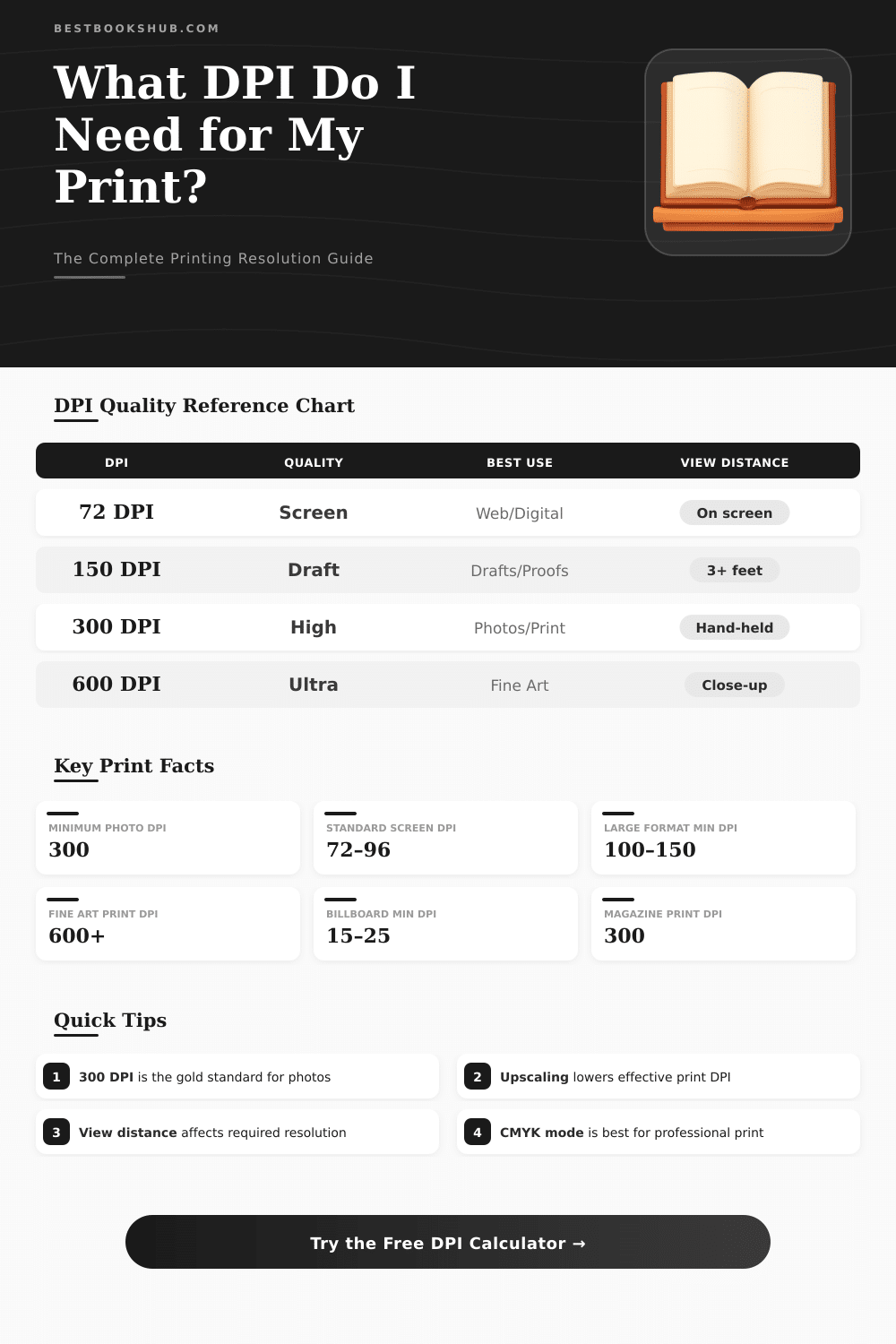
| DPI Range | Quality Level | Best Use Case | Recommended Viewing |
|---|---|---|---|
| 15–50 DPI | Very Low | Billboards, large banners | 20+ feet away |
| 72–96 DPI | Screen Only | Web, digital display | On screen only |
| 100–150 DPI | Draft | Proofs, large format prints | 3–10 feet |
| 150–200 DPI | Acceptable | Posters, casual prints | 3–5 feet |
| 200–250 DPI | Good | Enlargements, posters | 2–4 feet |
| 300 DPI | Excellent | Photos, documents, books | Hand-held / close |
| 400–600 DPI | Professional | Fine art, magazines | Any distance |
| 1200+ DPI | Ultra / Laser | Text, line art, technical | Any distance |
| Print Size | Min Pixels (W) | Min Pixels (H) | Min Megapixels |
|---|---|---|---|
| 4×6 in (10×15 cm) | 1,200 px | 1,800 px | 2.2 MP |
| 5×7 in (13×18 cm) | 1,500 px | 2,100 px | 3.2 MP |
| 8×10 in (20×25 cm) | 2,400 px | 3,000 px | 7.2 MP |
| 8.5×11 in (A4) | 2,550 px | 3,300 px | 8.4 MP |
| 11×17 in (28×43 cm) | 3,300 px | 5,100 px | 16.8 MP |
| 18×24 in (46×61 cm) | 5,400 px | 7,200 px | 38.9 MP |
| 24×36 in (61×91 cm) | 7,200 px | 10,800 px | 77.8 MP |
| Camera Megapixels | Pixel Dimensions | Max Print @ 300 DPI | Max Print @ 200 DPI |
|---|---|---|---|
| 2 MP | 1600×1200 | 5.3×4 in | 8×6 in |
| 5 MP | 2592×1944 | 8.6×6.5 in | 13×9.7 in |
| 8 MP | 3264×2448 | 10.9×8.2 in | 16.3×12.2 in |
| 12 MP | 4000×3000 | 13.3×10 in | 20×15 in |
| 16 MP | 4608×3456 | 15.4×11.5 in | 23×17.3 in |
| 24 MP | 6000×4000 | 20×13.3 in | 30×20 in |
| 36 MP | 7360×4912 | 24.5×16.4 in | 36.8×24.6 in |
| 45 MP | 8192×5464 | 27.3×18.2 in | 41×27.3 in |
DPI… Short for Dots Per Inch, is the measure for resolution and quality in the world of printing and graphics. Simply said, it shows you how many tiny ink dots a printer can lay in one linear inch of paper Those spots together form text, photographs and art on the page.
DISCLOSURE: This post may contain affiliate links, meaning when you click the links and make a purchase, I receive a commission. As an Amazon Associate I earn from qualifying purchases.
More spots, the sharper details and clearer result you receive.
DPI: What It Is and How It Changes Print Quality
When you raise the DPI, you get more well defined edges and cleaner image. Even so, higher DPI also consumes your toner or ink more quickly. If you print a big stack of documents or big images, tracking your supllies becomes quite important.
DPI also relates to this called “dot gain“… That happens when halftone dots expand a bit during the printing. Every printer lays those spots a bit differently, and the flow of ink on the paper depends on the combination of ink and paper you use.
To receive a clear image, you require enough pixels for your intended DPI and the final size. For instance, if you print an image 10 inches wide at 300 DPI, the image must have at least 3000 pixels across. Resolution and image size operate vice versa.
If you expand an image too much, it becomes blurry. If you shrink it, the definition improves.
For color prints, 300 DPI became the standard choice. It works for almost every printer and is a good standard to follow. Almost everything you hold in your hand, pamphlets, flyers, and such things, should have 300 DPI.
In a pinch, you occasionally can use 250 DPI. But for a poster seen from six feet, you can drop it to around 100 DPI and it still will look good. Signboards seen from far away (say, 30 feet away) require only at least 20 DPI.
Newspapers usually are between 150 and 200 DPI, while magazines stay around 300. Bigger formats, like banners, accept even lower resolutions without looking rough.
There is no sense to match the PPI of your file to the absolute maximum DPI of your printer. You do not require a 5760 PPI file only because the printer can reach 5760 DPI. Makers create different DPI options for different materials.
Canvas maybe reaches only 1440×1440 DPI, because it simply can not keep so much detail as bright photo paper, that can go up to 5760×1440 DPI. Because canvas lacks that capacity, raising it to too high a resolution doesn’t help.
Jump from 300 DPI to 600 DPI does not always give noticeably better results, the images can seem almost same. Also creating at 1200 DPI and later reducing it for a 300 DPI printer works well. Scaling down actually helps to keep the sharpness steady or even improve it, and it removes unwantedartifacts.