🎬 TikTok caption lab
TikTok caption length checker
Count TikTok caption length, hashtags, mentions, links, preview text, hook front-loading, CTA size, and safe-band fit before the caption reaches the publishing screen.
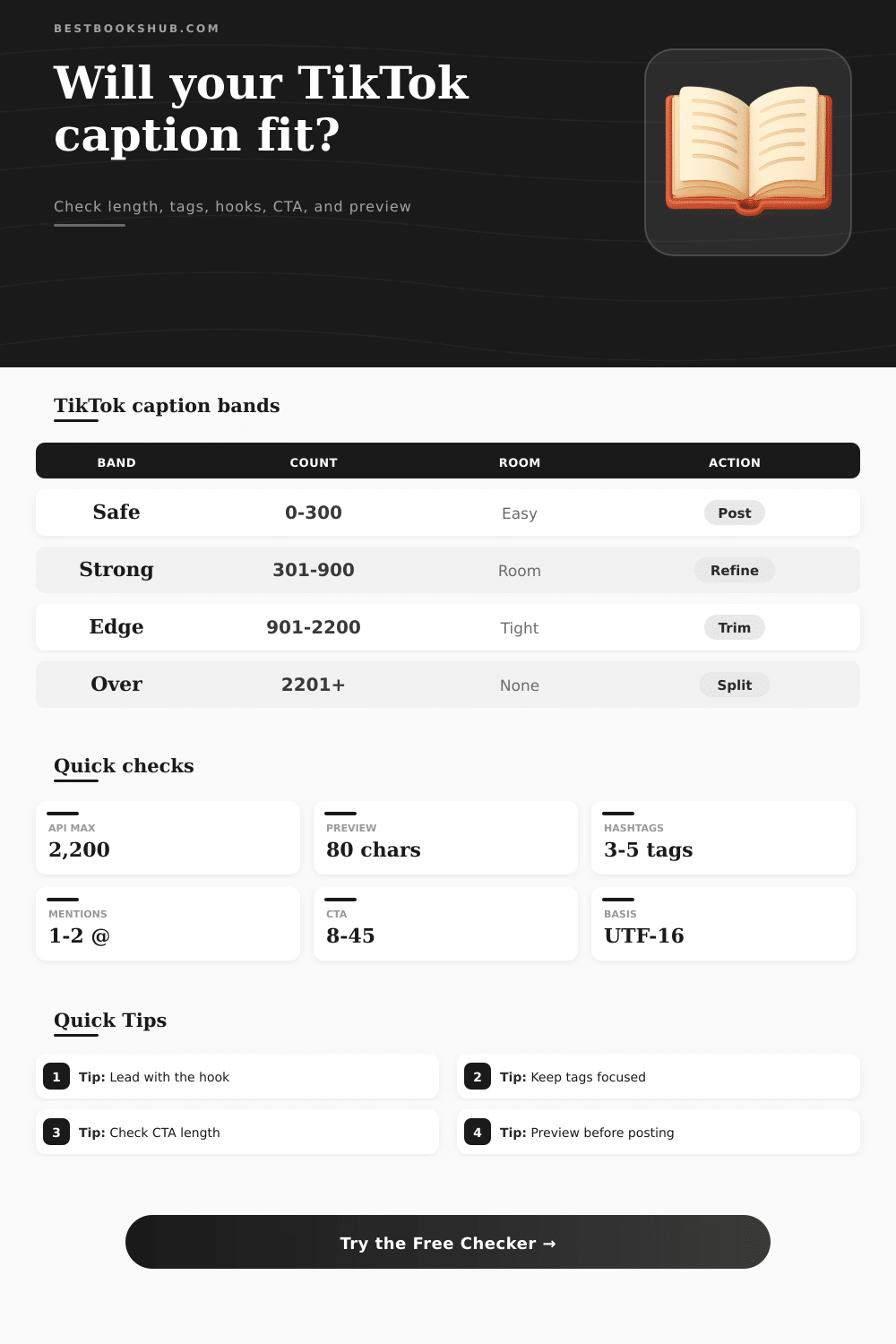
| Caption band | Effective count | Best use | Action cue |
|---|---|---|---|
| Micro hook | 0-120 | Fast trend, punchline, or simple prompt. | Add one focused tag if needed. |
| Safe caption | 121-300 | Hook plus context, CTA, and a few tags. | Usually strongest for skimming. |
| Context caption | 301-900 | Storytime, explanation, or searchable detail. | Check preview and trim filler. |
| Long caption | 901-2,200 | Dense narrative or instructions. | Move outcome and CTA forward. |
| Tag signal | Count range | Readability effect | Recommended move |
|---|---|---|---|
| No tags | 0 | Clean but less topical context. | Add one niche or series tag. |
| Focused tags | 1-5 | Usually readable and intentional. | Keep the most specific tags. |
| Heavy tags | 6-10 | Can crowd the caption ending. | Cut repeats and broad filler. |
| Tag wall | 11+ | Looks noisy and can hide the CTA. | Move to a smaller final cluster. |
| Hook factor | Strong signal | Score impact | Why it matters |
|---|---|---|---|
| Opening words | Question, number, or contrast. | High | The first line decides whether people keep watching. |
| Keyword lead | Main phrase in the first 40 characters. | Medium | Helps the caption match search intent fast. |
| Concrete detail | Specific noun, result, or timeline. | Medium | Specific captions feel less generic. |
| Weak opener | Filler such as just, so, or today only. | Penalty | Soft openings waste the visible preview. |
| Publishing path | Limit cue | Safe band | Use when |
|---|---|---|---|
| TikTok API/direct | 2,200 UTF-16 | Up to 2,000 | Scheduling or app integrations. |
| Native long draft | Custom check | Under your cap | Drafting in app-specific flows. |
| Preview-first | 300 chars | 80-150 lead | Trend, review, and hook posts. |
| Cross-post edit | 300-500 | Platform safe | Reuse with Instagram or Shorts notes. |
DISCLOSURE: This post may contain affiliate links, meaning when you click the links and make a purchase, I receive a commission. As an Amazon Associate I earn from qualifying purchases.
So, here’s a caption length checker for TikTok captions to see what is and isn’t showing up in your schedule or post before it goes out. Everything happen in those first few seconds on the For You page. Even if your video is genius, if caption below looks buried or flat, viewers will scroll right over it. It can be as simple as whether you cram too much info into the first few words or keep rest of the caption clean enough to support it.
For example, when you drop a caption into the tool, it display where the pressure points sits. It’s the preview window that counts because most people will only see a small portion before tapping. You can increase your chance of a pause by putting the right phrase at the beginning of that narrow band. Once you adjust length of your preview and hook window, the calculator does the math for you. No more guesswork on whether your best line are even visible.
How to Write Better TikTok Captions
It’s one thing with a 120-character micro hook. Every word deserve a spot. But there isn’t space for context. It’s another thing when you’re stretching beyond 900-characters; here, write an essay, but make sure it’s worth the scroll. That’s why we have these bands. You get safe space to post roughly 300 characters. This allow you to open with something strong, share some backstory, tell them what to do next and add a handful of on-point tags. This way, you won’t overwhelm the algorithm or your reader. Only stretch the format out to breathe when it realy calls for it. Such as in searchable resources, or long-form storytime.
Then there’s the stealth math of hashtags and mentions. Tag too little and you fail to get topical lift. Tag too much and your caption become noise and buries the actual action you’re trying to get someone to take. Three to five focused tags usually hits the sweet spot. Place them at the end to avoid fighting with hook for attention.
Similarly, calls to action follow same rules. An eight to forty-five character phrase read as an invitation vs. It is a demand. Longer phrases is skimmed, while shorter ones can feel abrupt.
The errors also tend to cluster. Some writers hide their best line toward the end because that’s how payoffs work, but they overlook the fact that most people don’t see anything but top part of your post, thanks to the platform. Others fill caption with buzzwords and vapid openers, cramming in as many trending terms as possible, like using Twitter as a service without adding value. These signal are red flags for the tool: It identify where keywords appear and shows you what works. That way, you have a clear reading of your post before publication.
But tone is not in the numbers. Even a technically appropriate caption for any band can feel desperate or corporate depending on voice behind it. The best ones are like getting a text from a friend about something they think you should of check out. Start with curiosity. They deliver on the promise quickly. And then an action at the close that doesn’t feel tacked on, but naturaly.
It’s not so much a matter of counting exactly as it is knowing how many additional characters will cost you in reader attention. Cut the fat. Move the result along. Give the first line weight. Make your preview grab attention without needing the full caption to explain itself. You’re home. Now it’s up to the audience, and to the algorithm, scrolling for its next high.