👁 Reading rhythm lab
Words per fixation calculator
Estimate how many words are processed per eye fixation using reading speed, fixation duration, saccade timing, regressions, and text density.
| Reading context | Typical WPM | Fixation pattern | Words per fixation |
|---|---|---|---|
| Leisure novel | 220-320 | Moderate stops, low regressions | 1.2-1.7 WPF |
| Dense nonfiction | 170-240 | Longer stops, moderate regressions | 0.9-1.3 WPF |
| Textbook study | 120-210 | Long stops, frequent rereads | 0.7-1.2 WPF |
| Academic paper | 90-180 | Slow parsing, high regression load | 0.5-1.0 WPF |
| Structured skim | 350-650 | Shorter stops, selective detail | 1.8-2.8 WPF |
| Fixation + saccade | Cycles per second | Cycles per minute | Notes |
|---|---|---|---|
| 180 ms + 25 ms | 4.88 | 293 | Fast visual sampling rhythm |
| 220 ms + 30 ms | 4.00 | 240 | Common fluent reading estimate |
| 260 ms + 35 ms | 3.39 | 203 | Careful prose or light study |
| 320 ms + 40 ms | 2.78 | 167 | Dense, technical, or proofing work |
| 420 ms + 45 ms | 2.15 | 129 | Very difficult or unfamiliar text |
| Average line length | At 1.0 WPF | At 1.5 WPF | At 2.0 WPF |
|---|---|---|---|
| 45 characters | 8 stops/line | 5-6 stops/line | 4 stops/line |
| 60 characters | 10 stops/line | 7 stops/line | 5 stops/line |
| 75 characters | 13 stops/line | 8-9 stops/line | 6-7 stops/line |
| 90 characters | 15 stops/line | 10 stops/line | 8 stops/line |
DISCLOSURE: This post may contain affiliate links, meaning when you click the links and make a purchase, I receive a commission. As an Amazon Associate I earn from qualifying purchases.
Did you know that when you read your eyes don’t glide along a page? They jump around. They do this all the time, from fixation to fixation, those is called saccades. In between they pause. This is what allows your brain to take bits of information it sees in rapid bursts. It is not every letter.
But how many words do you get with each stop? If you understand how many words you’re capturing with each stop, then you’ll learn way more about yourself as a reader than any raw metric of speed will tell you. Words per minute doesn’t mean anything about comprehension load or even about efficiency. It’s just a number on a screen.
How Your Eyes Really Read
The tricky part about all this math around when your eyes track across a page is that the calculator do it for you while you concentrate on interpreting the results. Many readers think: Faster is always best. That is not true. Eye tracking experiments reveal that our brains slows down if we’re faced with dense text or unfamiliar material, which is good. Slowing down allow for meaning to be taken from content. It’s a tradeoff and it must happen.
You’ll notice in the calculator that you can tweak values such as regression rates and fixation duration to understand how those factor affect your effective span. Twenty percent of your time spent rereading things you’ve already read? Your forward pace will suffer alot. Speed isn’t everything. When your mind starts to doubt what it first read, or even lose track of context entirely, it has regressed. This lowers reading efficiency. To account for this, the calculator let you say how much your mind will regress. And while a high number may feel wasteful, it could also mean you’re reading something hard and getting lost in it. You’re not skimming… You’re double-checking your work.
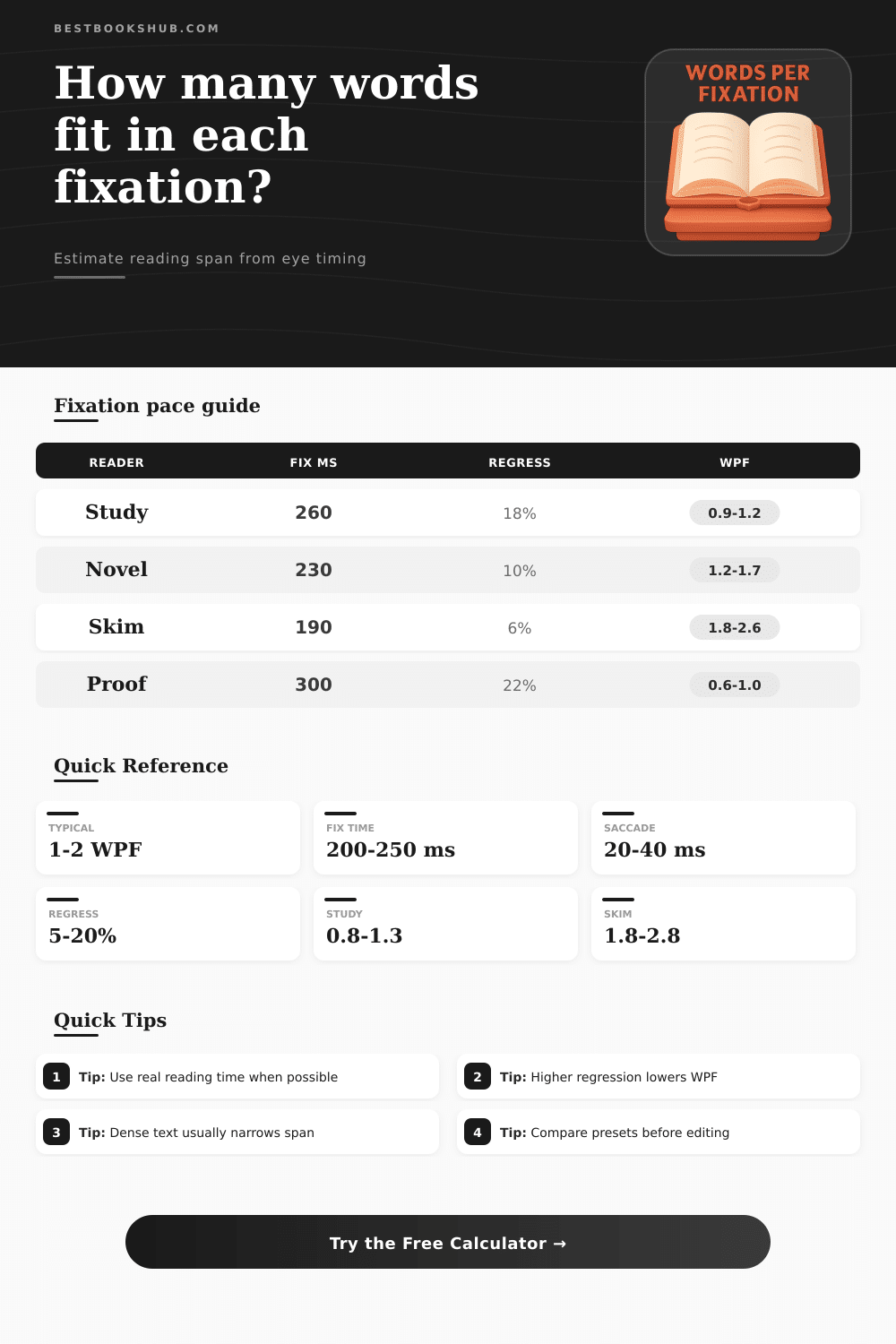
Most people do this wrong; they think they are slow so they must be inefficient, but slowing down actualy improves accuracy. How fast you read depends heavily on text density. Think about how much harder it is to parse an academic paper compared to a dialogue-rich novel. A novel has familiar vocabulary and a predictable structure. Paper: unfamiliar terms, need to stop regularly to decode the syntax. On the right-hand side of the page, you’ll notice a table comparing words per fixation between study situations and leisure reading. Note the low WPF numbers for technical reading, many under 1. Don’t worry if you’re slow at this. You’re not; you’re just chewing over data points instead of following the narrative.
Another factor most people don’t think about is line length. Lines that are too long wear out the eye because they require more time to move back to the beginning of the following line, it also makes it easier to lose your place and fall behind. In general, shorter lines (roughly 50-75 characters) hold their own better in terms of keeping a consistent rhythm. There is an option in the calculator to test pacing with different formats. It may seem minor, but if you’re creating reading material or editing a document, every little bit helps.
Some folks say they read with huge words-per-look spans, three or four word at once, even. That’s technically possible when you’re skimming. But your ability to understand is limited by how much information your brain can process at once. To go past that limit usually means you are just recognizing shapes rather than keeping the meaning. The tool’s presets provide a base here for expectations, providing realistic ranges for various reading goals. To proofread requires accuracy more than speed, so the span tightens. To skim requires breadth, so it opens up.
A good reality check regarding the physics of eye movements is the timing conversion table. You can’t hack away at the biology constraining human eyes with technique or even software. For fluent readers, fixation durations tend to hang out in that two-hundred- to two-hundred-fifty-millisecond range. Attempt to force them below this and you’ll often find yourself experiencing spikes in regression as your brain scrambles to play catch-up. Your visual system wasn’t designed to scan each pixel in real-time; it was built to sample information. This comes back to the idea of reading as an exchange between what you expect and what your eyes see.
The calculator cracks open those black box mechanisms and shows how one thing measures another. You don’t have to become an expert at all the inputs. If you play around with text density or regression and see how it changes your results, it will start to change how you read challenging texts. It’ll help you stop trying to fight against your natural speed, and begin matching your reading tactics to the texts needs. That space you’re spending pausing isn’t wasted. That’s when it sinks in.